Build a large world and walking end to end becomes a chore. Sometimes a button that flies you there beats building stairs to the second floor.
VRChat has a mechanism for moving a player to a specified location. Used as-is, though, you sink into the floor, or fall again the moment you arrive.
This article builds a teleporter with a set position and facing, where you reliably end up standing.

What You'll Learn
- Defining the landing point with an empty object
- How to control the facing after landing
- What to do about carried-over falling momentum
- That teleporting only works on yourself
Start from having tried variables and references.
Define the landing point with an empty object
Teleporting needs two things: position and facing.
You could write coordinates as numbers directly, but it isn't recommended. Every position adjustment means editing code, and numbers alone don't let you picture the landing.
Instead, place an empty object as the landing point.
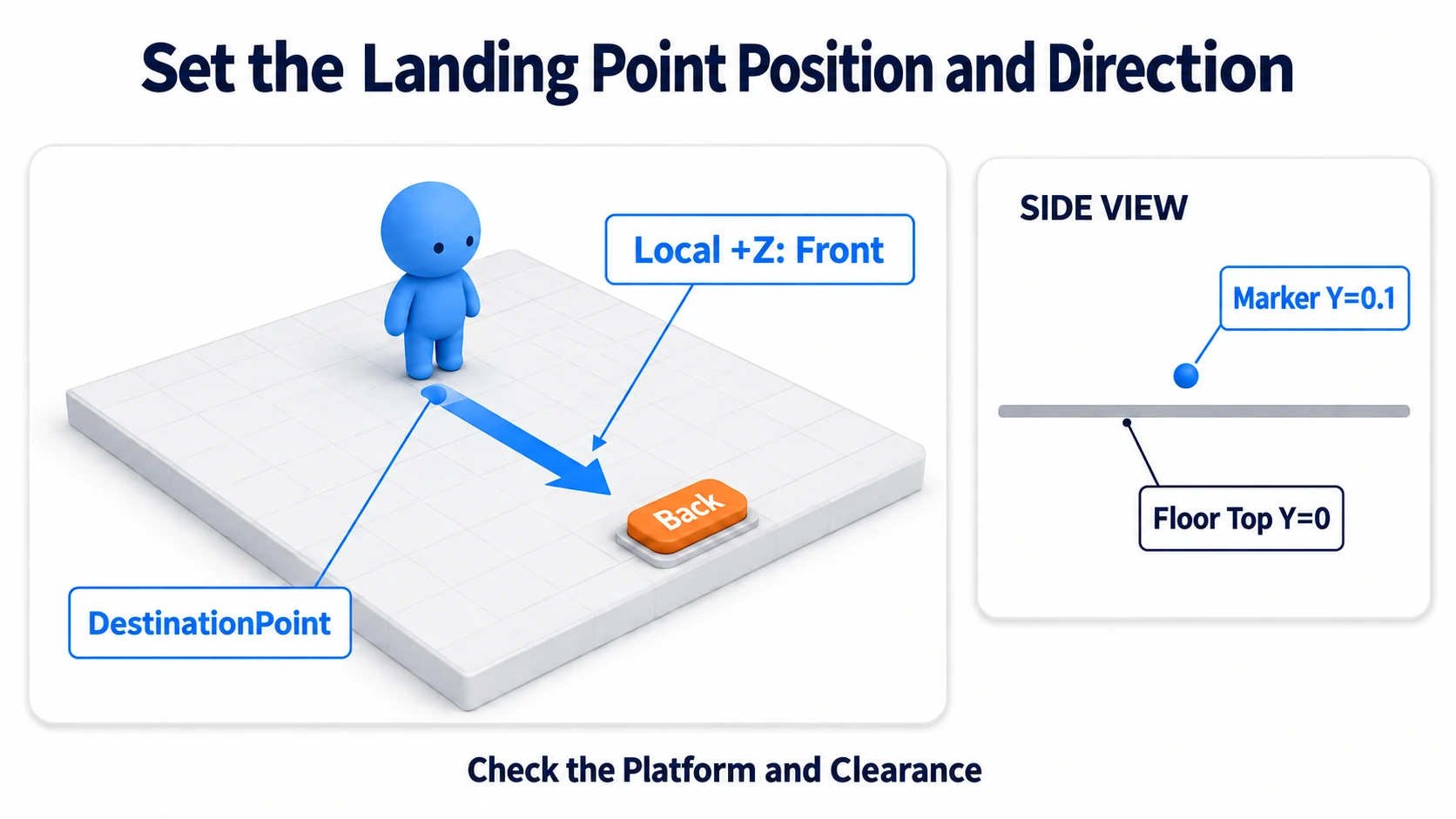
That gives you this:
- You set the position by dragging in the Scene view
- The blue arrow (Z axis) becomes your facing after landing
- The code just says "to that object's location"
Since it's an empty object with no visuals, nothing shows in the world. It's a marker only the builder sees.
This line is the heart of the code.
Networking.LocalPlayer.TeleportTo(destination.position, destination.rotation);
Networking.LocalPlayer is "the owner of the PC currently running this code." That's the important part: you can only teleport yourself. You can't move other people.
For "I want to bring that person here," you need their PC to run the same code. That means network events, which this article doesn't cover.
Hands-On: Fly to another floor with a button
Press a button and fly to a floor set some distance away. You land facing forward and can walk right away.
1. Place the destination floor and landing point
Add the following to a scene with a floor.
| Name | How to make it, and settings |
|---|---|
FarPlatform | Cube. (12, -0.1, 0), Scale (4, 0.2, 4) |
TeleportButton | Cube. (0, 1, 1), Scale (0.4, 0.4, 0.4) |
TeleportTarget | Create Empty. (12, 0.1, 0), Rotation (0, 180, 0) |
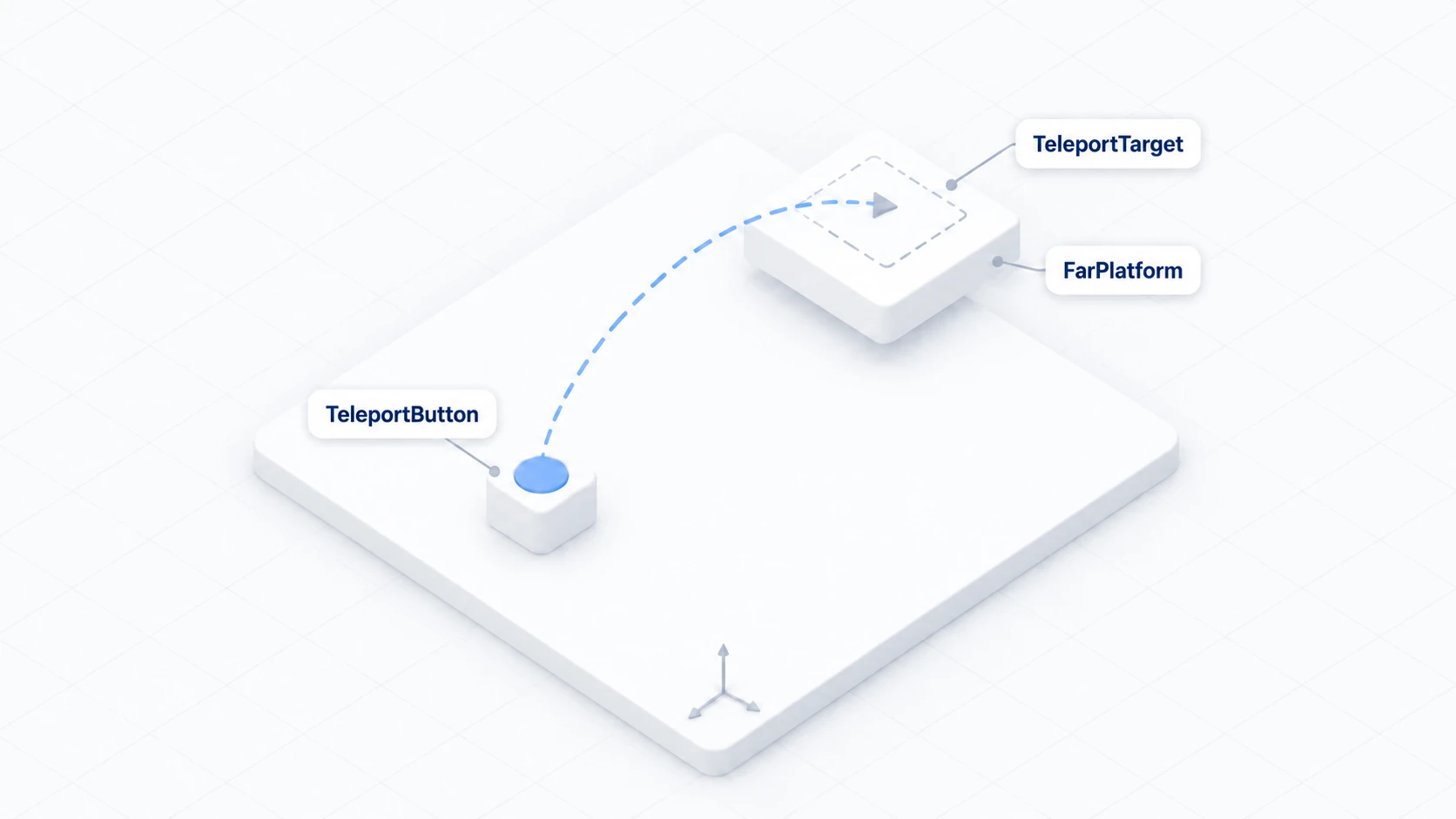
FarPlatform is a 4m-square floor 12m away from the original. Its top surface sits at Y=0.
TeleportTarget is the landing point. Y is 0.1, a little above the floor's surface. Exactly 0 can cause you to sink in.
Rotation Y = 180 makes you face back toward the original floor on arrival. Selecting TeleportTarget in the Scene view shows a blue arrow, and where it points becomes your facing after landing.
2. Write the code
In Assets/Scripts, choose "Create → U# Script" and make SimpleTeleporter.
using UdonSharp;
using UnityEngine;
using VRC.SDKBase;

[UdonBehaviourSyncMode(BehaviourSyncMode.None)]
public class SimpleTeleporter : UdonSharpBehaviour
{
    [SerializeField] private Transform destination;

    public override void Interact()
    {
        if (destination == null)
        {
            Debug.LogWarning("[Teleporter] Destination is not set.");
            return;
        }

        VRCPlayerApi player = Networking.LocalPlayer;
        if (!Utilities.IsValid(player)) return;

        // Pass position and facing together
        player.TeleportTo(destination.position, destination.rotation);

        // Kill the falling momentum
        player.SetVelocity(Vector3.zero);

        Debug.Log("[Teleporter] moved");
    }
}
It's short. The point is passing the landing point's position and rotation straight into TeleportTo.
Utilities.IsValid(player) is how you confirm the player is valid. It occasionally can't be obtained, so check before use.
The meaning of SetVelocity(Vector3.zero) is covered in the next section.
3. Assign it and confirm
Add a Udon Behaviour to TeleportButton and set SimpleTeleporter. Drag TeleportTarget into Destination. Set Interaction Text to Fly across.
Press Play and try it.
| Action | Expected result |
|---|---|
| Press the button | You stand on FarPlatform instantly |
| Right after landing | You face back toward the original floor (the Z axis direction) |
| Walk from there | You walk normally on the floor |
| Fall off the edge | Standard fall recovery returns you to the spawn point |
4. Build a return button too
Without a button on the far side, falling is your only way back. Let's make it a round trip.
- Create a Cube near
FarPlatformasReturnButtonat(12, 1, 1) - Create
HomeTargetwith "Create Empty" near the original floor at(0, 0.1, 0), Rotation(0, 0, 0) - Attach the same
SimpleTeleportertoReturnButtonand set Destination toHomeTarget
The same script gets reused with a different destination. That's the payoff of putting the landing point in the Inspector rather than in the code.
Preventing the fall on arrival
The most common teleport trouble is falling again the moment you arrive.
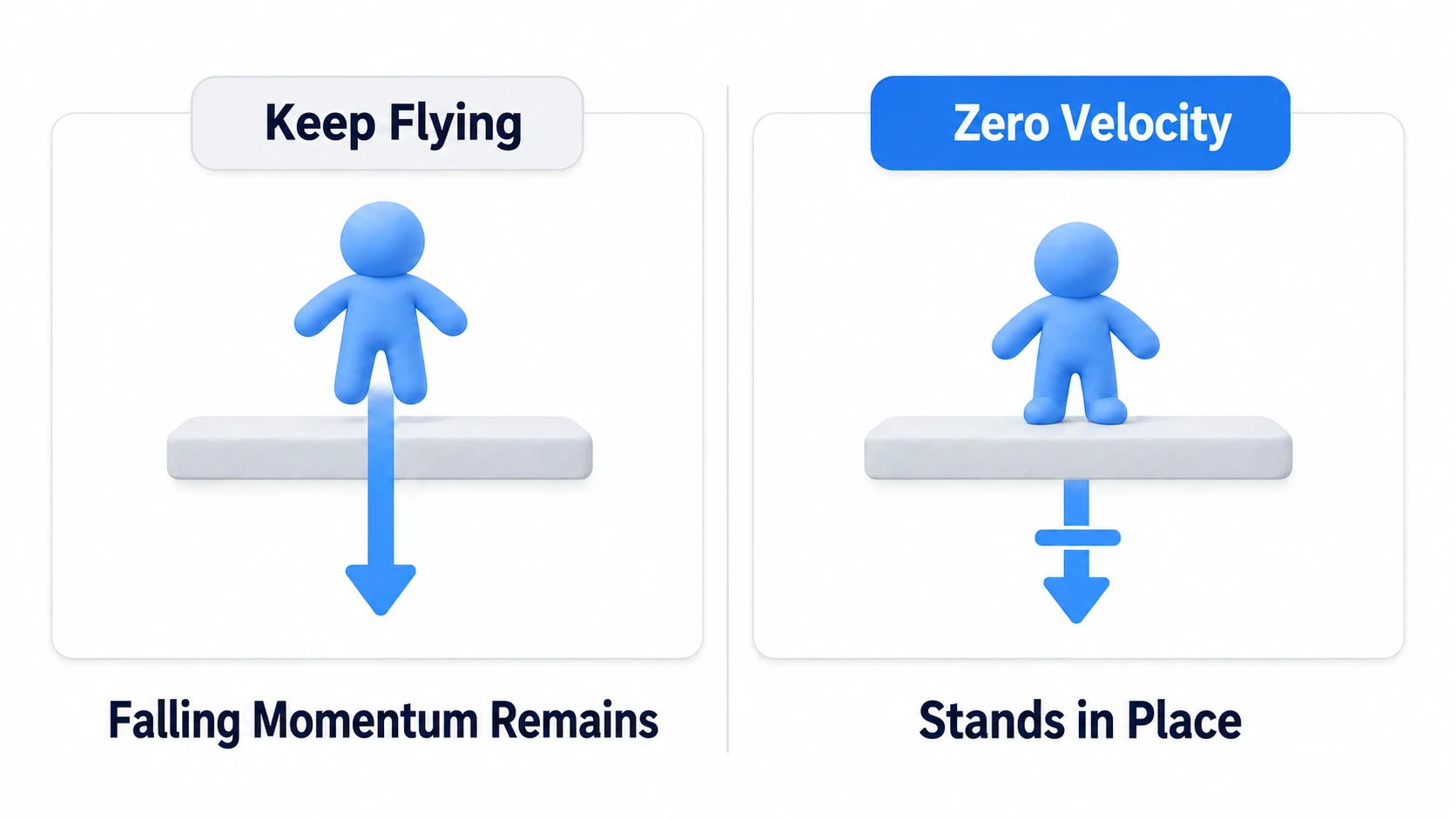
The cause is falling momentum (velocity) being carried over. Teleport mid-fall and only the position changes; the downward momentum comes with you. The instant after you appear at the landing point, you drop through the floor.
The fix is SetVelocity(Vector3.zero). Zero the speed right after teleporting.
player.TeleportTo(destination.position, destination.rotation);
player.SetVelocity(Vector3.zero);
Now you start from standing still.
The other cause is the landing point being buried in the floor. Matching Y to the floor's surface can sink you in, depending on collision. Placing it about 10cm above the surface is safe.
Cover those two and most teleports are stable.
Common Pitfalls
- It doesn't fly → Check whether Destination is
None. Check the startup warning too - You sink into the floor → Raise the landing point's Y about 10cm above the floor's surface
- You fall on arrival → Check that you're calling
SetVelocity(Vector3.zero) - The facing is wrong → Adjust the landing point's Rotation. The blue arrow in the Scene view is your facing
- Other people don't get teleported → That's by design. You can only teleport yourself
Bonus: Good to Know Up Front
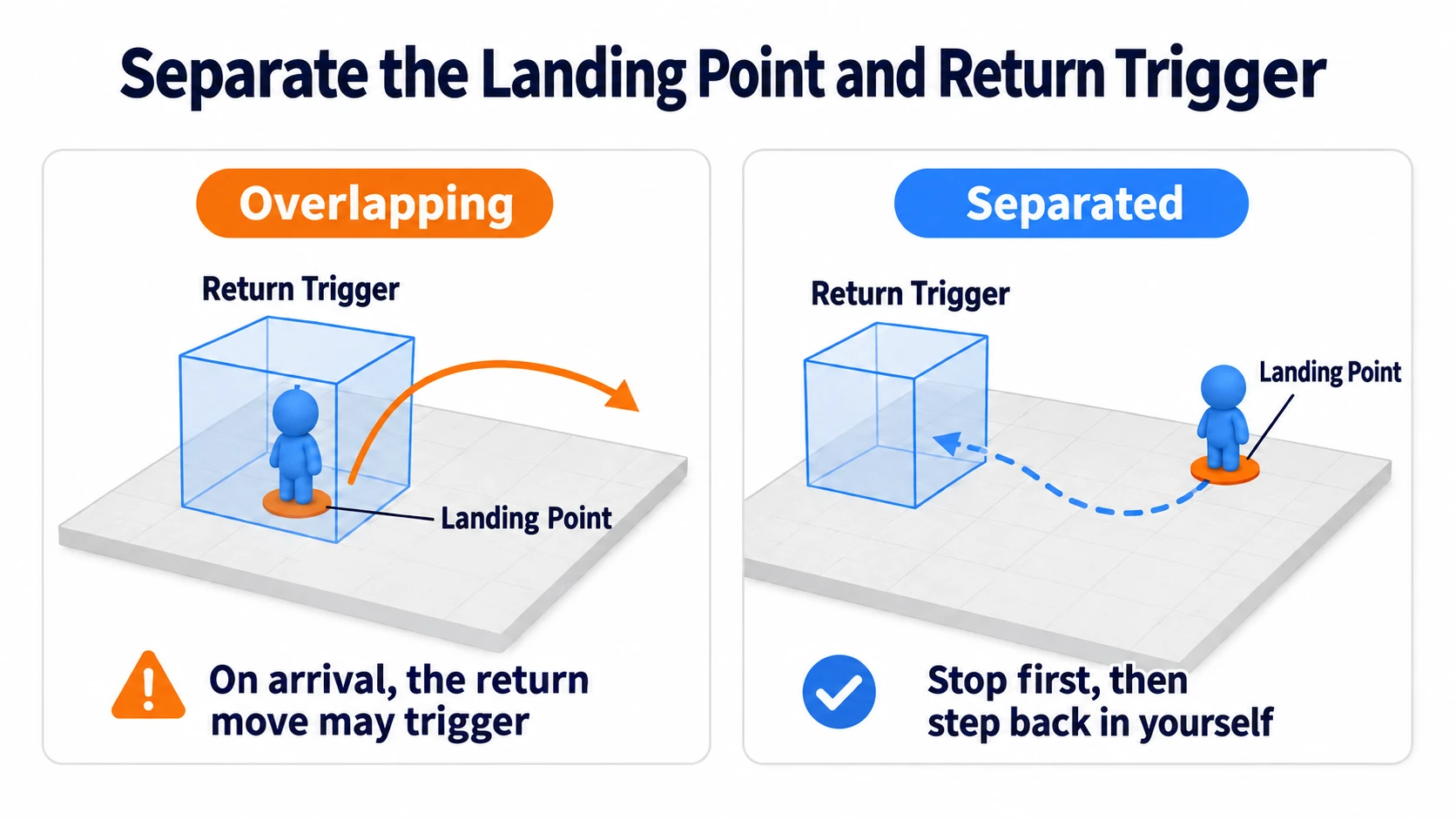
- A trigger version works too: You can fly on entering a volume rather than pressing a button. But if the landing point sits inside another trigger, you fly forever. Keep the landing point away from triggers. The mechanism is covered in detecting areas with triggers
- Be mindful of VR comfort: Instant movement itself rarely causes sickness, but a large view rotation right after landing does for some people. Set the landing facing to an angle that flows naturally with travel
- Handle rapid presses: Build it so repeated presses in quick succession cause no trouble. Flying to the same place is harmless, but when effects are involved, block it using the ideas in calling logic after a delay
- It's useful all over: Moving between sections of a large exhibition world, switching rooms in an escape game, returning to the start of an obstacle course. All the same shape
- Different from standard fall recovery: A mechanism that returns you after falling can also be built from Scene Descriptor settings. When to use which is covered in fall recovery and checkpoints
Summary
Teleporting is just passing two things: position and facing.
- Build the landing point from an empty object. You adjust it in the Scene view, and it sets the facing
- Put the landing point about 10cm above the floor's surface
- Kill the momentum with
SetVelocity(Vector3.zero)right afterTeleportTo - You can only move yourself. Other people can't be moved
The question to ask while building is: "On arrival, can I just start walking?" No sinking and no falling means it passes.
Next comes a mechanism for returning people who fall. Go to fall recovery and checkpoints. To place an entrance to other worlds, connecting to other worlds with portals; to build volume-based detection, detecting areas with triggers.