Relaxed music while exploring, a switch to something intense the moment combat starts, and an even bigger sound when the boss appears. That music reacting to the situation is a hallmark of great games. Looping one track endlessly just can't carry the tension of a scene.
This kind of dynamic music control is called adaptive music , and from Godot 4.3 onward you implement it with AudioStreamInteractive and AudioStreamSynchronized. This article covers the difference between the two approaches, designing switch timing, and building a music manager that swaps between exploration and combat.
What You'll Learn
- The two approaches to adaptive music (clip switching / layering)
- Switching music clips based on state with
AudioStreamInteractive- Choosing switch timing (immediate, end of clip, next beat)
- Adding and removing parts with
AudioStreamSynchronizedfor layered music- Building an exploration/combat music manager on a single player
Tested with: Godot 4.7
Two Approaches: Clip Switching and Layering
There are broadly two ways to build adaptive music, and your choice determines which class you use.
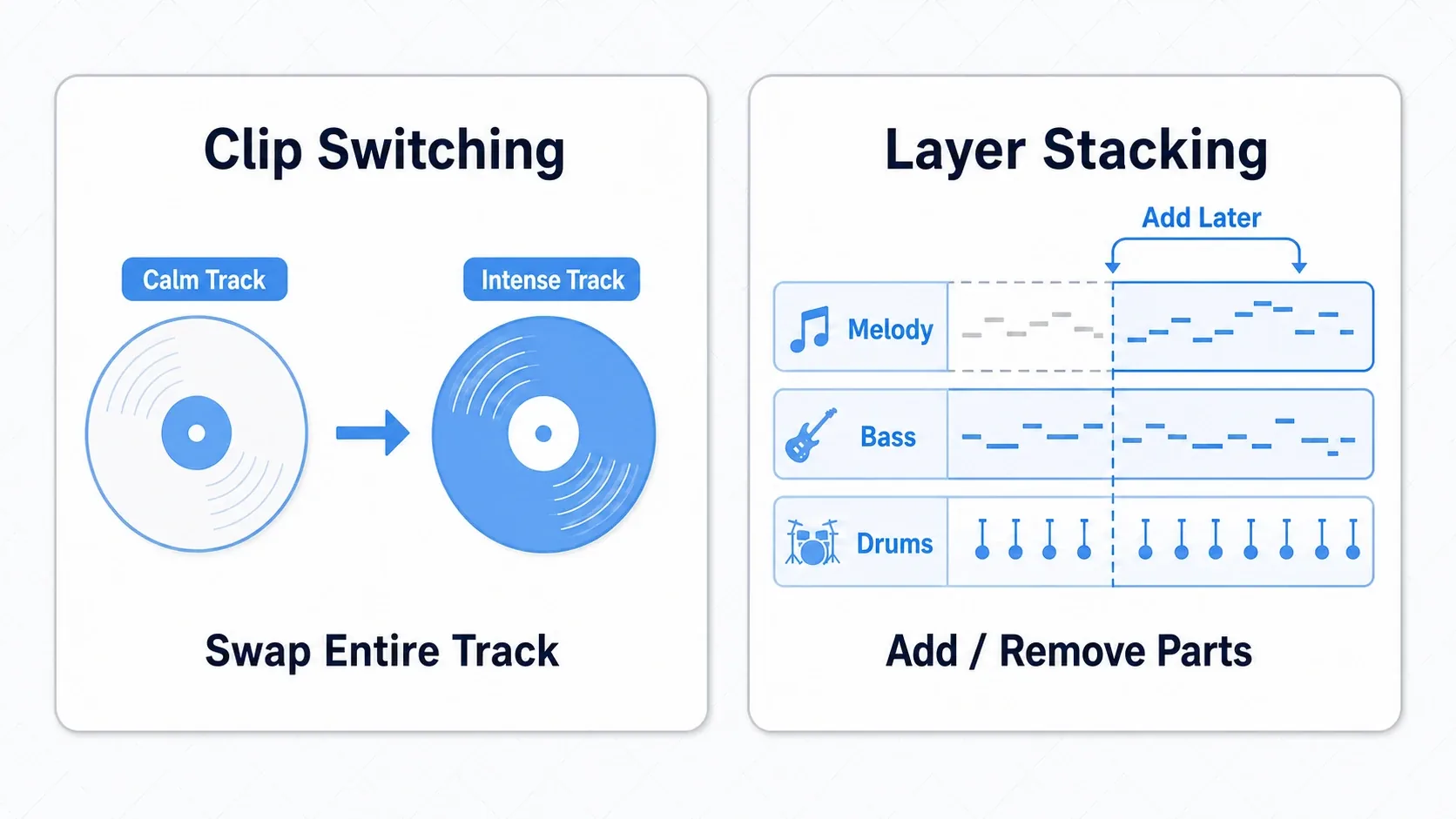
- Clip switching : replace the track wholesale with an exploration version, a combat version, and so on. You can write completely different music per scene, and the change is unmistakable. Use
AudioStreamInteractive - Layering : add and remove parts (drums, bass, melody) within the same track. Great for gradual, smooth build-ups like adding drums as enemy count grows. Use
AudioStreamSynchronized
You aren't limited to one. You can combine them by making each switched clip a layered stream internally. Let's look at each in turn.
AudioStreamInteractive: Switching Tracks
AudioStreamInteractive is a resource that switches between multiple music clips based on state . You collect states like exploration, combat, and boss into one resource, and transition to the matching clip whenever the game situation changes.
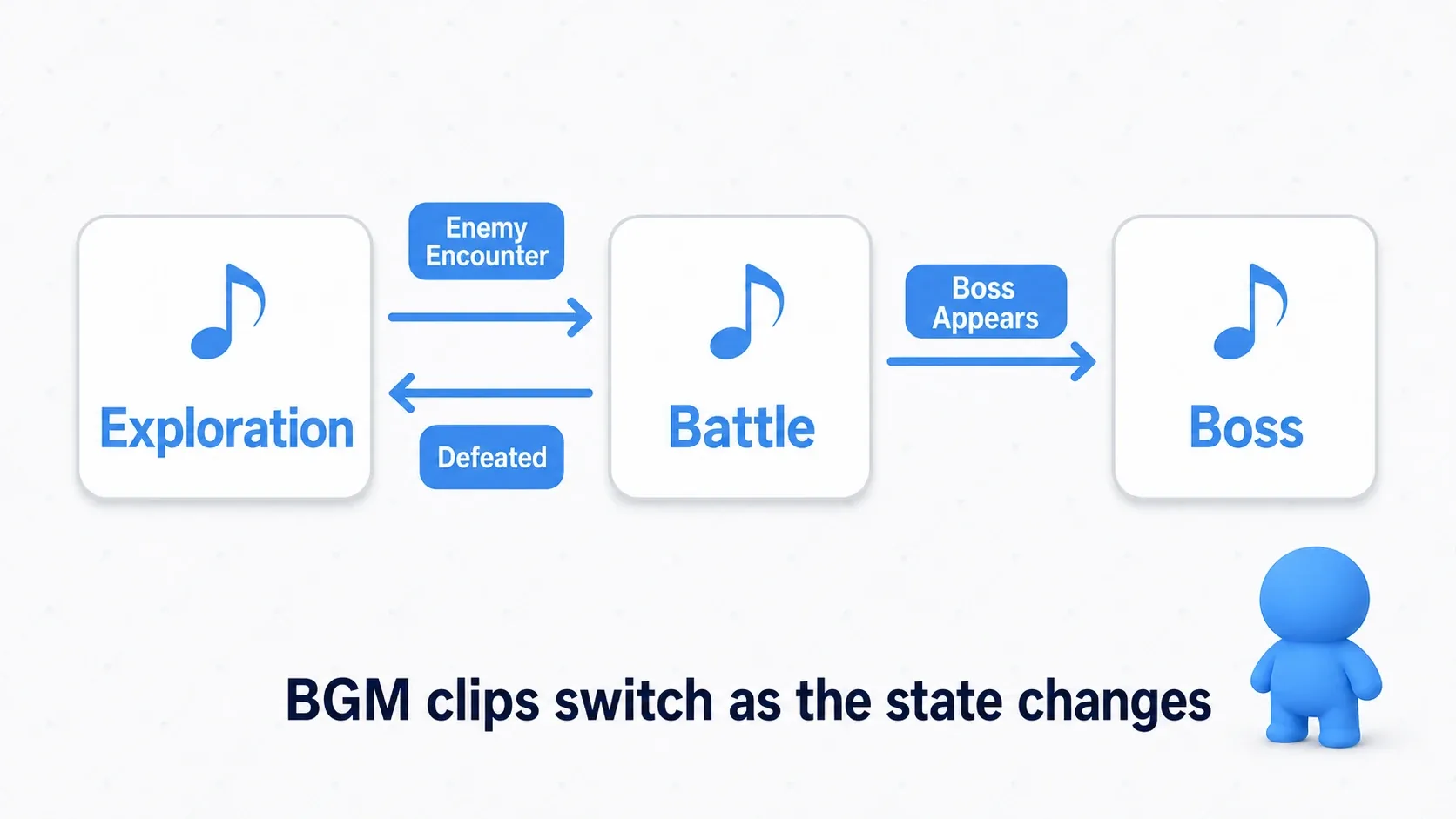
Building AudioStreamInteractive in the editor inspector is the easy way (you can also assemble it from GDScript with set_clip_stream(), add_transition(), and so on).
- Right-click in the FileSystem, choose "New Resource", and pick
AudioStreamInteractive - Add clips with "Add Clip" under "Clips" and assign a name and AudioStream to each one (for example,
explorationandcombat) - Click "Edit Transitions" to open the transition table and set the timing for each from-clip/to-clip pair
- Save it as a
.tres
Turn on "Loop" in the import settings of each clip's audio (Ogg / MP3). It's off right after import, so without it the track stops after playing once.
The script side just loads the resource you built and plays it.
# Load and play the .tres built in the editor
var music := preload("res://audio/bgm_interactive.tres")
$AudioStreamPlayer.stream = music
$AudioStreamPlayer.play()
Switch Timing
The strength of AudioStreamInteractive is fine control over how clips change over . Even for the same "switch to combat," timing alone changes the feel dramatically.
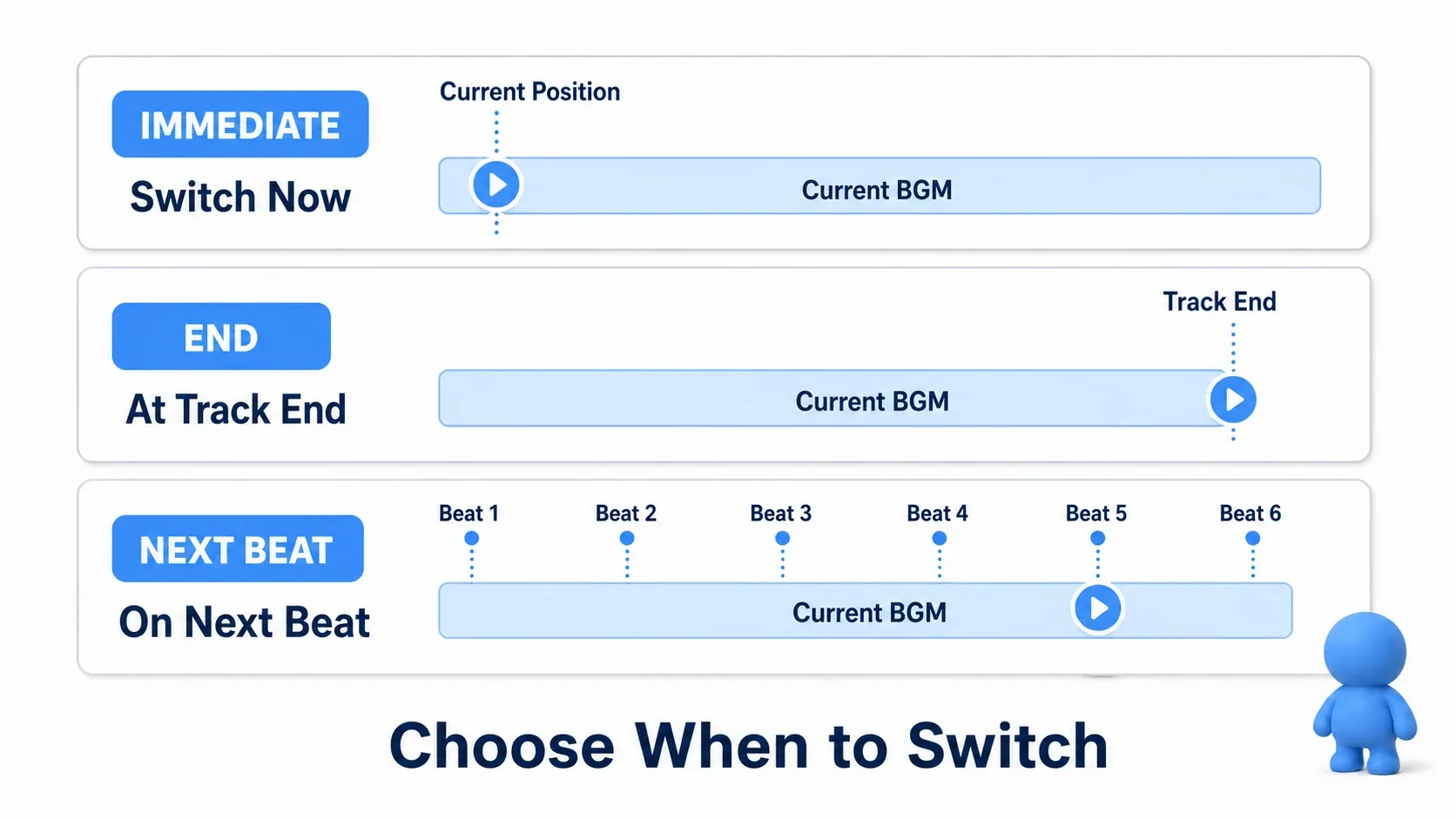
| Timing | Constant | When to use |
|---|---|---|
| Switch immediately | TRANSITION_FROM_TIME_IMMEDIATE | When you want instant tension, like the start of combat |
| At the end of the clip | TRANSITION_FROM_TIME_END | When you want a natural return, like combat ending back to exploration |
| On the next beat | TRANSITION_FROM_TIME_NEXT_BEAT | When you want a smooth switch without breaking rhythm |
| On the next bar | TRANSITION_FROM_TIME_NEXT_BAR | When you want a clean switch at the top of a bar |
To wait for beats and bars, enter the track's tempo (BPM), total beats in the track (Beat Count), and beats per bar (Bar Beats) in the audio's import settings. BPM is 0 right after import, and then the switch happens right away without waiting for a beat (WAV files can't hold these settings).
Use IMMEDIATE to snap into combat and END to let the track finish before returning. Keeping entries immediate and returns natural makes the music sit neatly against the scene.
AudioStreamSynchronized: Stacking Layers
The other approach is layering, which adds and removes parts of the same track . AudioStreamSynchronized plays multiple tracks in perfect sync and lets you control each track's volume independently.
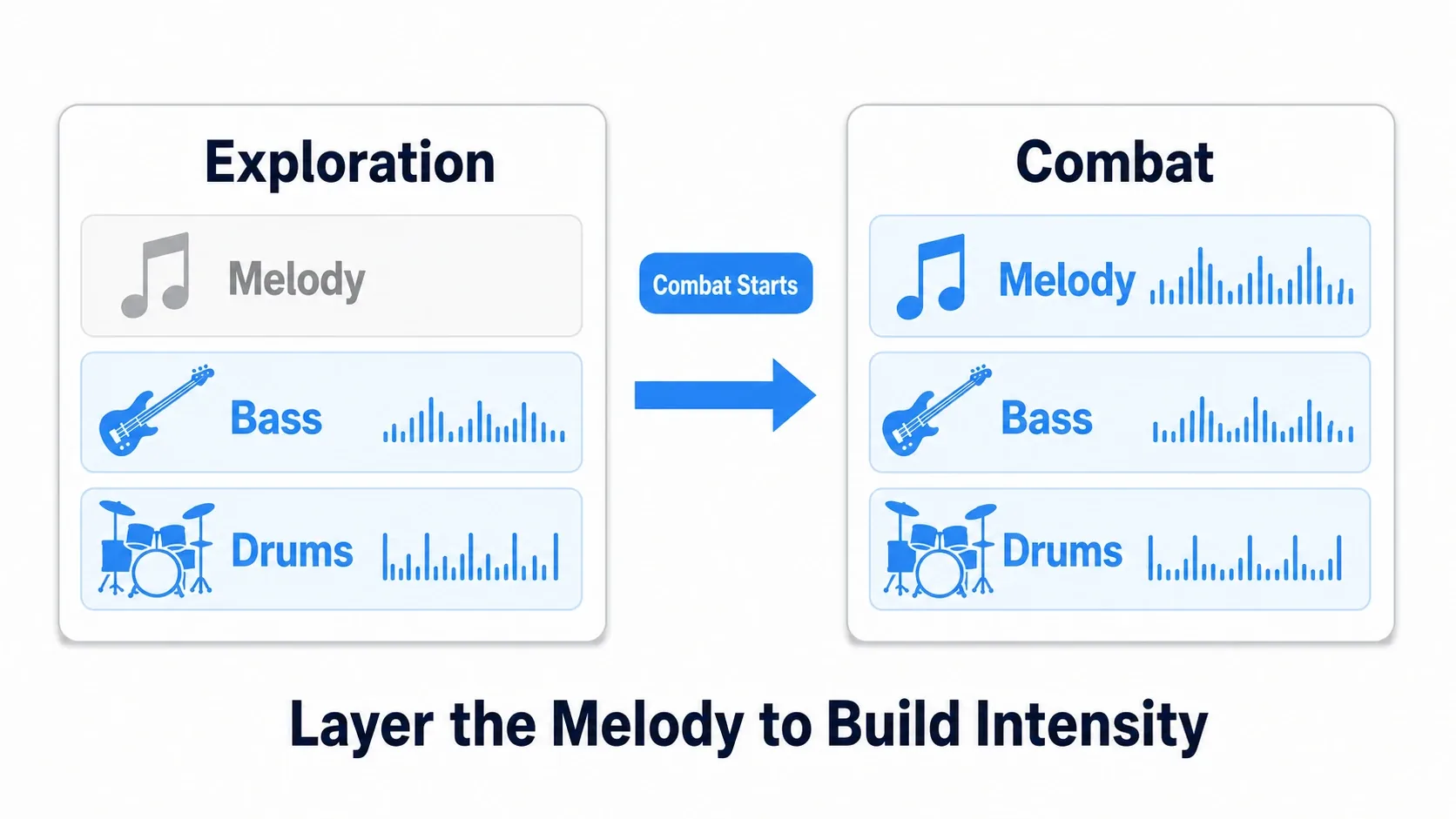
First prepare three tracks, drums, bass, and melody, and start with the melody muted.
var layered := AudioStreamSynchronized.new()
layered.stream_count = 3
layered.set_sync_stream(0, drums_track)   # Drums
layered.set_sync_stream(1, bass_track)    # Bass
layered.set_sync_stream(2, melody_track)  # Melody

layered.set_sync_stream_volume(0, 0.0)    # Drums: normal
layered.set_sync_stream_volume(1, 0.0)    # Bass: normal
layered.set_sync_stream_volume(2, -80.0)  # Melody: near silent (raised later)

$AudioStreamPlayer.stream = layered
$AudioStreamPlayer.play()
When combat begins, bring the melody's volume up gradually with Tween. Adding it abruptly sounds jarring, so fading it in is the trick.
# Combat starts: fade in the melody layer
func start_combat() -> void:
    var music := $AudioStreamPlayer.stream as AudioStreamSynchronized
    # Fade from -80dB (silent) to 0dB (normal) over 1 second
    create_tween().tween_method(
        func(db): music.set_sync_stream_volume(2, db), -80.0, 0.0, 1.0)
Because every part is already playing in sync, you add and remove layers without any drift by simply changing volume. That's what makes layering feel so good.
Hands-On: An Exploration/Combat Music Manager
Let's use clip switching to build a music manager you could ship. Exploration versus combat in an action RPG, floor versus boss in a roguelike, normal versus detected in a stealth game. The structure of "moving between two states" takes the same shape regardless of genre.
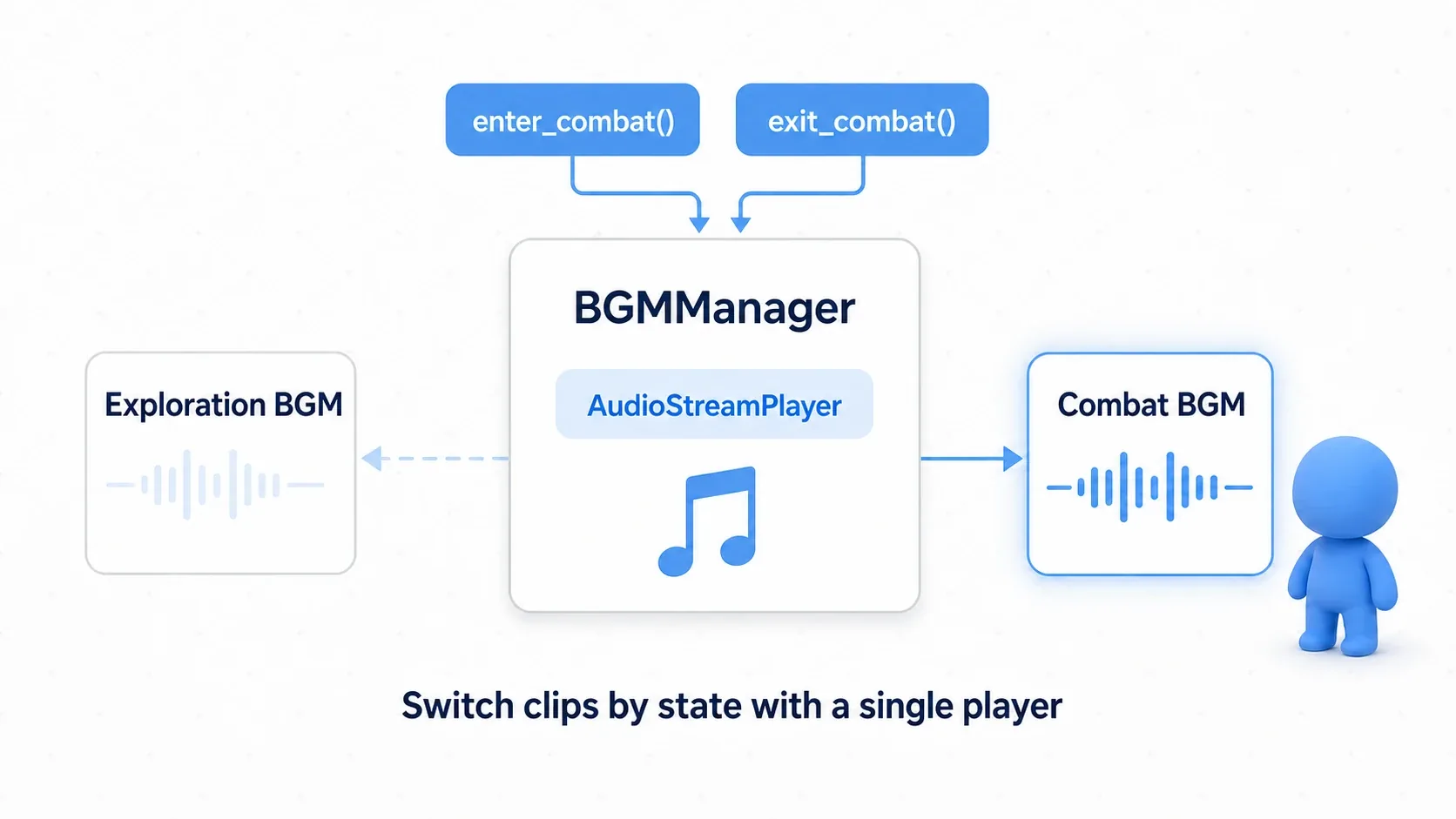
The key is keeping exactly one AudioStreamPlayer for music and switching clips from its active playback. Making it an Autoload so any scene can call it is handy.
extends Node

@onready var music_player: AudioStreamPlayer = $AudioStreamPlayer
var current_state := "exploration"

func _ready() -> void:
    music_player.stream = preload("res://audio/bgm_interactive.tres")
    music_player.play()

func enter_combat() -> void:
    if current_state != "combat":      # Avoid redundant switches to the same state
        switch_to("combat")
        current_state = "combat"

func exit_combat() -> void:
    if current_state != "exploration":
        switch_to("exploration")
        current_state = "exploration"

func switch_to(clip_name: String) -> void:
    # Get the active playback and switch clips by name
    var playback := music_player.get_stream_playback() as AudioStreamPlaybackInteractive
    playback.switch_to_clip_by_name(clip_name)
There are two points to take away.
- One player, swapping its contents by state : adding an
AudioStreamPlayerper track invites double playback and orphaned players. Consolidating on one player plusswitch_to_clip_by_name()is the golden rule. - Remember the current state :
current_staterecords the current music and skips switches to the same state . Without it, every enemy encounter mid-combat restarts the music from the top.
On the editor side, setting exploration to combat as IMMEDIATE and combat to exploration as END makes entries sharp and returns natural.
Best Practices
- Consolidate music on one player : keep a single
AudioStreamPlayerand change clips withswitch_to_clip_by_name() - Immediate entries, natural returns : design transitions with
IMMEDIATEfor combat start andENDfor combat end - Smooth it with fades : use 0.5 to 1.0 second fades when adding layers or changing clip volume to avoid abrupt jumps
- Manage state explicitly : hold the current music in
current_stateand prevent redundant switches to the same state - Clip switching and layering combine : make each clip an
AudioStreamSynchronizedand you get both state switching and gradual build-ups
Bonus: Good to Know for Later
- For simple continuous playback, use
AudioStreamPlaylist: if all you need is sequential or random music playback, this is simpler with no transition configuration. ChooseAudioStreamInteractivewhen you need state transitions. - Build in the editor, keep code focused on playback control : Building
AudioStreamInteractivein the inspector lets you see what you're setting. Limiting GDScript to "when, and to which clip" keeps things readable. - Trigger switches with signals : to notify
AudioManagerof enemy detection or a boss appearing from various places, emitting state changes as signals keeps things loosely coupled. - Bus setup and effects live in the earlier articles : music bus volume and fades build on audio management basics and AudioBus effects.
Summary
- Two approaches :
AudioStreamInteractive(swap whole tracks) andAudioStreamSynchronized(add and remove parts) - Transitions : choose
IMMEDIATE,END, orNEXT_BEATto match the scene - Layering stacks parts by fading each track's volume with Tween
- In practice : one
AudioStreamPlayerplusswitch_to_clip_by_name()swaps clips per state, andcurrent_stateprevents redundant switches
Start by building an AudioStreamInteractive with two tracks, exploration and combat, and hear the difference between IMMEDIATE and END for yourself. Once the music starts reacting to the scene, your game gains a whole extra dimension of feel.
Further Reading
- Audio management basics (AudioStreamPlayer and Audio Bus) : the foundation for music playback and buses
- Sound design with AudioBus effects : shaping and fading the music bus
- Smooth animation with Tween : smoothing layer volumes and fades
- Managing data across scenes with Autoload : making the music manager a singleton
- Godot official docs: AudioStreamInteractive : primary source on clips and transitions