Write enemy AI as a pile of if statements and it gets unmanageable as conditions multiply. But a state machine alone tends to hit "state explosion," where transitions tangle as states grow. "Chase and attack when you spot the player, patrol when you don't, flee when health drops." A behavior tree (BT) is what lets you organize and build that kind of prioritized, complex behavior.
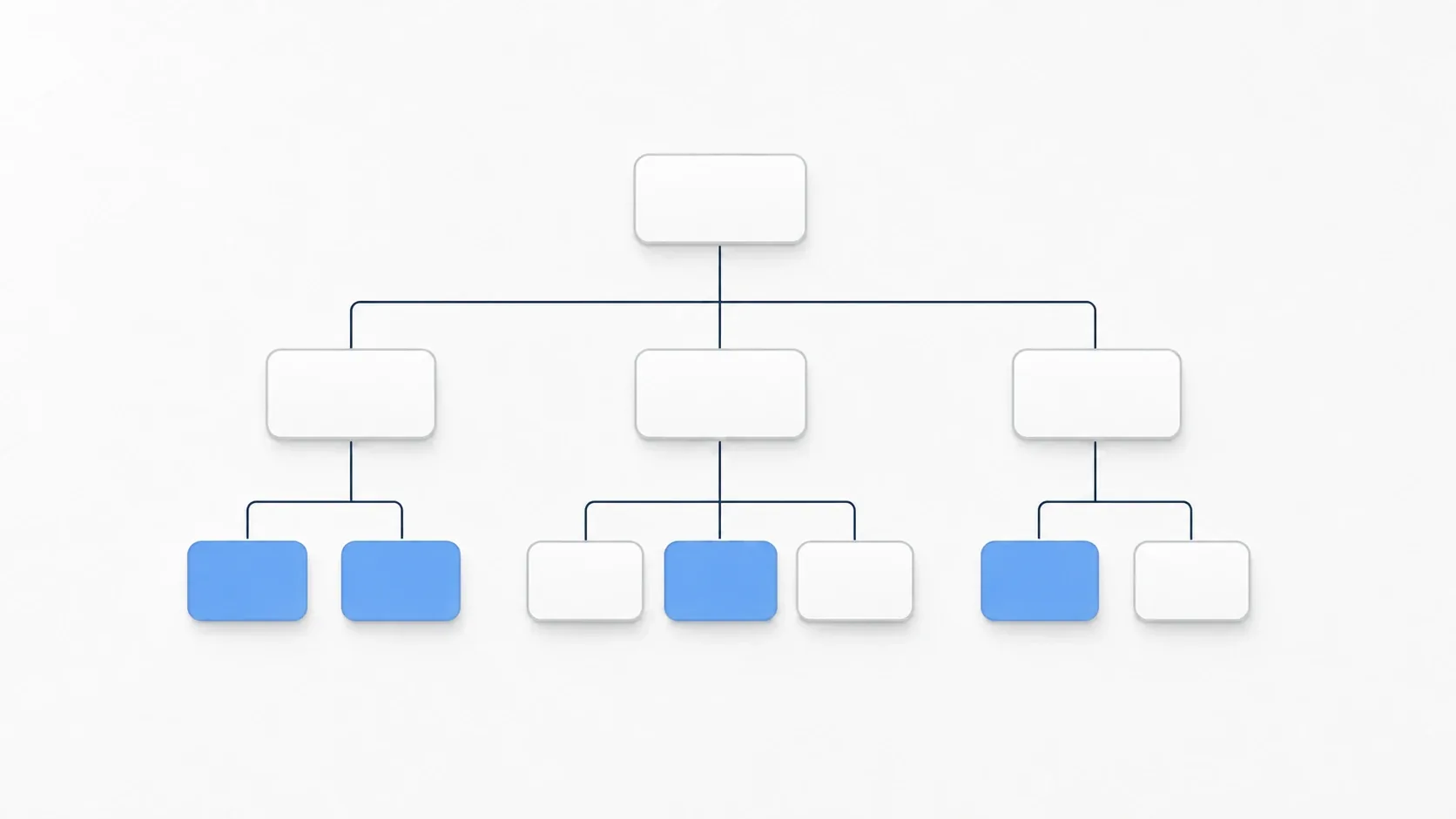
A BT expresses behavior as a hierarchical tree of tasks. In this article, we implement a small BT from scratch in GDScript and take it all the way to a working enemy AI.
Godot has no built-in BT feature. This article is structured around understanding the mechanism by building it yourself in GDScript. For production work, an addon like beehave gives you a visual editor and debug display, which pays off at scale. Grasp the mechanism first, then move to an addon when you need it.
What You'll Learn
- How BTs differ from state machines (a tree of tasks vs. a web of states)
- The four node types that make up a BT (Sequence / Selector / Decorator / Leaf)
- How
Sequence(AND) andSelector(OR) behave, and how to implement them- Assembling an enemy AI tree (spot the player and fight, otherwise patrol)
- Sharing data between nodes loosely with a Blackboard
Tested with: Godot 4.7
What a Behavior Tree Is (vs. a State Machine)
State machines and BTs both manage AI behavior, but they think about structure differently.
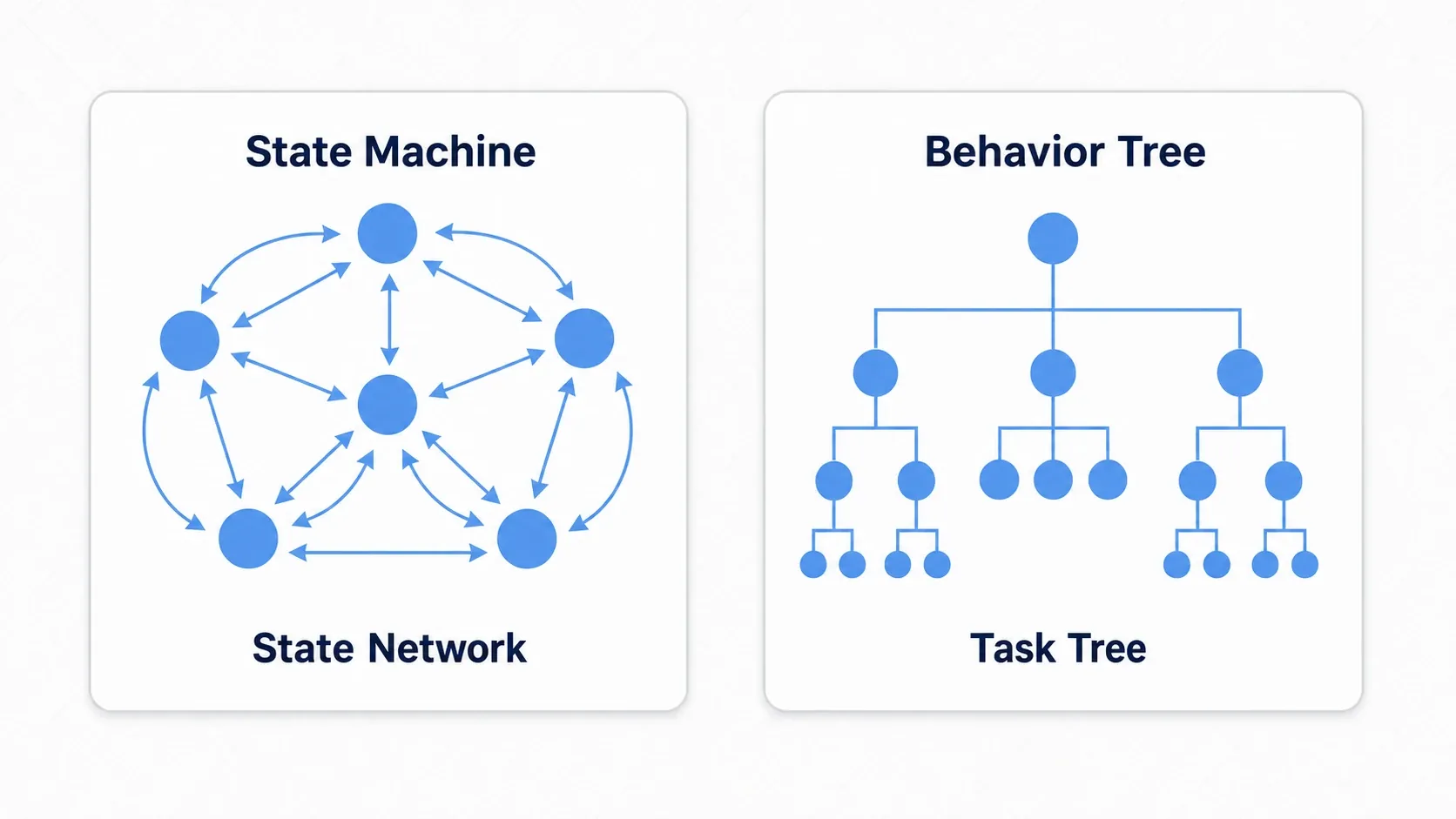
- State machine (a web of states): connects states like "patrol," "chase," and "attack" with transitions. As states grow, the number of transitions explodes and gets tangled
- Behavior tree (a tree of tasks): expresses behavior as a tree structure. Higher means higher priority, you extend it by adding branches, and subtrees are reusable
Prioritized decisions like "try attacking first, flee if that fails, otherwise patrol" map directly onto the order of branches in a BT. A state machine is plenty for simple AI, but once behaviors multiply and get complex, that's the BT's moment.
The Four Node Types
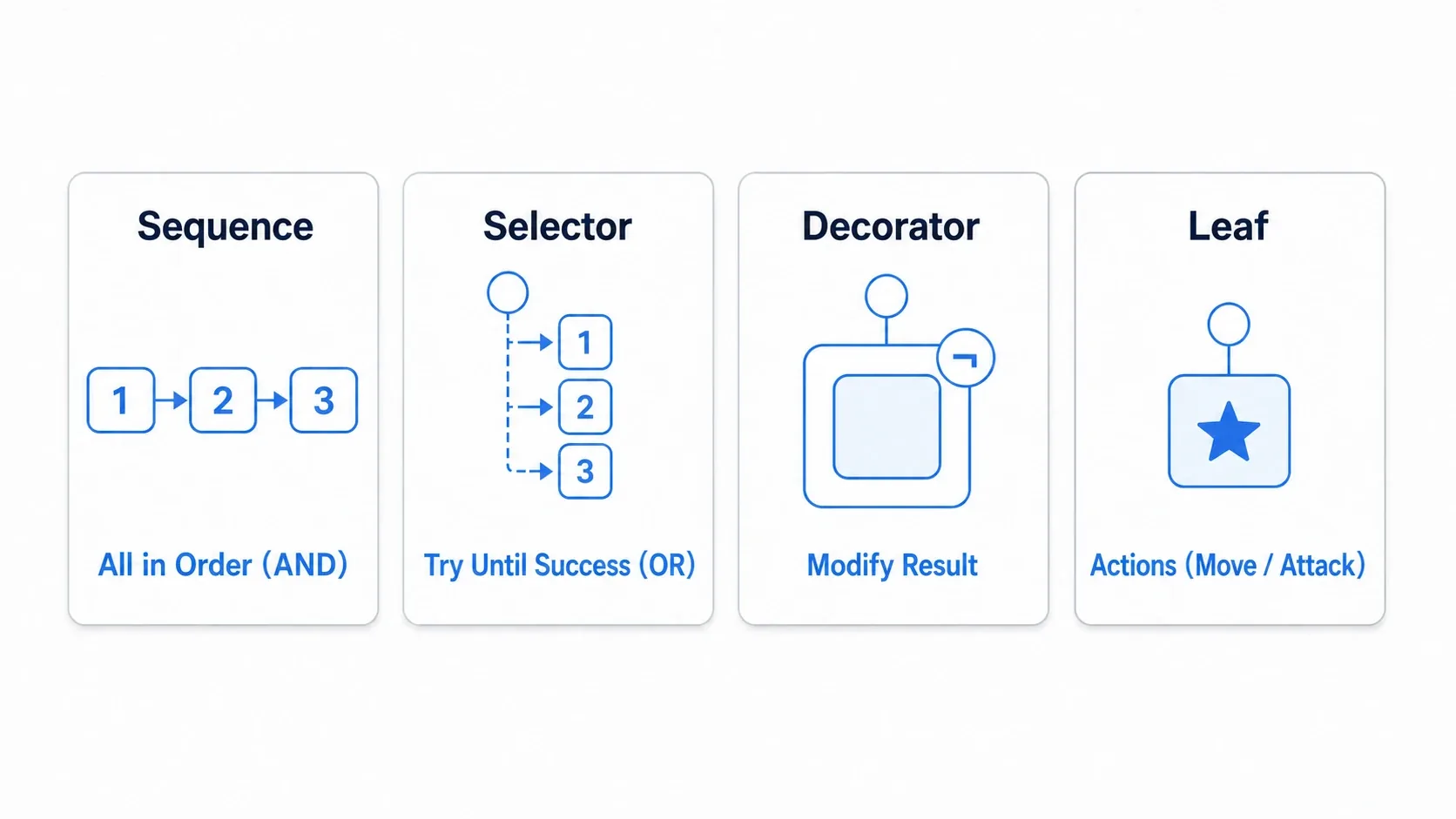
A BT is built by combining just four kinds of nodes.
| Node | Role | Result |
|---|---|---|
| Sequence | Runs children in order (AND) | SUCCESS if all succeed / FAILURE if one fails |
| Selector | Tries children in order (OR) | SUCCESS if one succeeds / FAILURE if all fail |
| Decorator | Transforms a child's result (invert, repeat, etc.) | The transformed result |
| Leaf | The actual work (moving, attacking, etc.) | SUCCESS / FAILURE / RUNNING |
Every node is evaluated via tick() and returns one of SUCCESS, FAILURE, or RUNNING. RUNNING represents still in progress, like "still moving, not done yet," and it's a state unique to BTs.
Let's start with the base class everything builds on (using type registration with class_name).
# bt_node.gd
class_name BTNode
extends Node

enum Status { SUCCESS, FAILURE, RUNNING }

# Evaluation method that subclasses override
func tick(actor: Node, blackboard: Dictionary) -> Status:
    return Status.FAILURE
actor: the entity running this tree (the enemy character, for example)blackboard: the data dictionary shared between nodes (covered below)
Implementing Sequence and Selector
Let's implement the two nodes at the heart of control flow. The important part is grasping how their behavior differs.
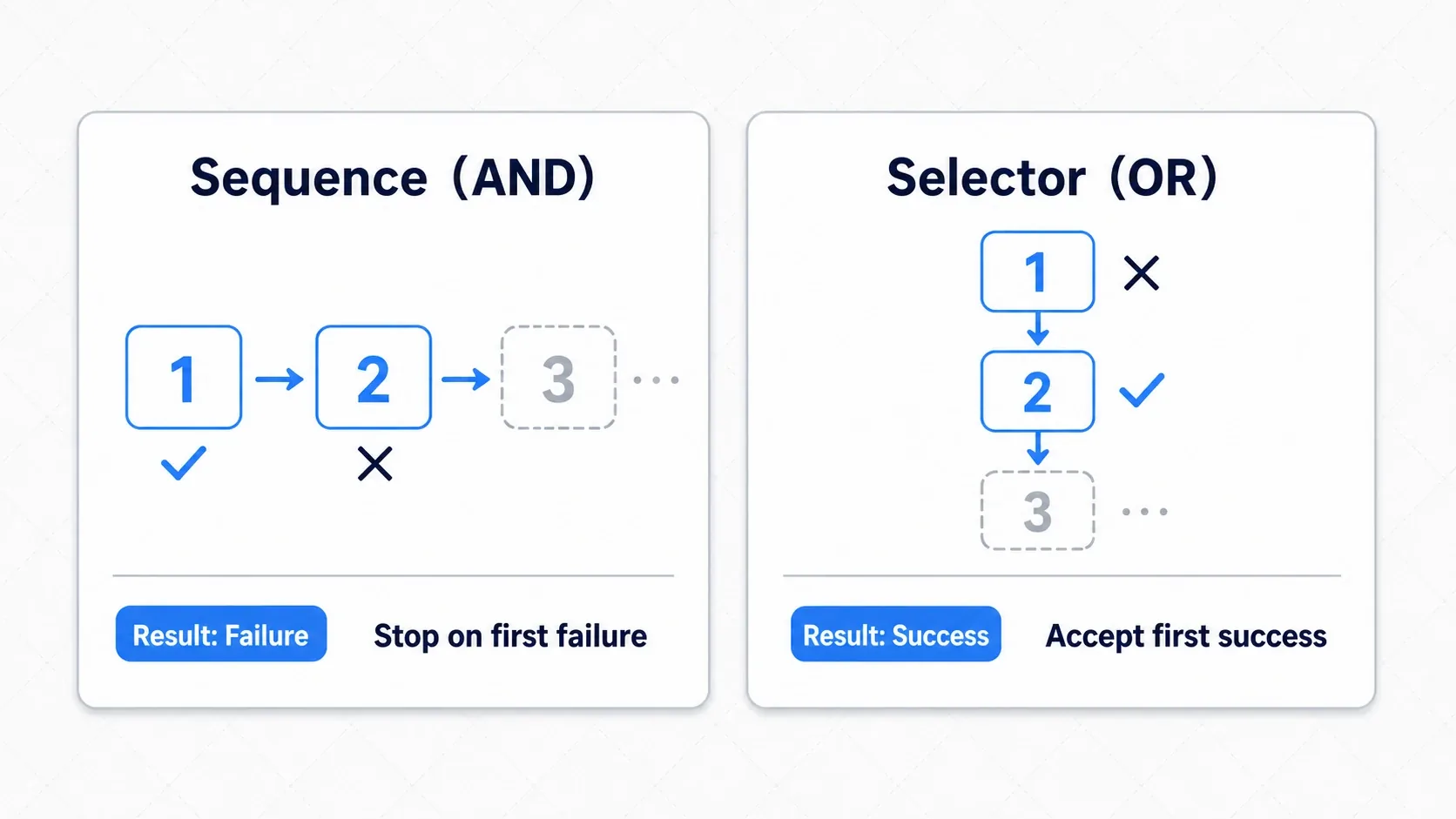
Sequence (AND) runs children in order and aborts the moment one fails. Use it for a chain of actions you need to carry out all the way through, like "find the enemy, close in, attack."
# bt_sequence.gd
class_name BTSequence
extends BTNode

func tick(actor: Node, blackboard: Dictionary) -> Status:
    for child in get_children():
        var status: Status = child.tick(actor, blackboard)
        if status == Status.FAILURE:
            return Status.FAILURE   # Abort immediately if any child fails
        if status == Status.RUNNING:
            return Status.RUNNING   # Still running, so we stop here for this frame
    return Status.SUCCESS           # All succeeded
Selector (OR) tries children in order and commits to the first one that succeeds. Use it for prioritized choices like "heal, or flee, or fight."
# bt_selector.gd
class_name BTSelector
extends BTNode

func tick(actor: Node, blackboard: Dictionary) -> Status:
    for child in get_children():
        var status: Status = child.tick(actor, blackboard)
        if status == Status.SUCCESS:
            return Status.SUCCESS   # Commit to the first success and finish
        if status == Status.RUNNING:
            return Status.RUNNING
    return Status.FAILURE           # All failed
The two are exact mirror images. Sequence stops on failure, Selector stops on success. Once that clicks, the rest is just combining them.
Writing the Real Work in Leaf Nodes
If Sequence and Selector decide how to choose, a Leaf is what actually gets done. This is where concrete game logic goes: moving, attacking, waiting. Here's an example that moves toward a target.
# bt_move_to_target.gd
class_name BTMoveToTarget
extends BTNode

@export var move_speed: float = 100.0
@export var arrival_distance: float = 40.0   # Larger than the distance where the bodies collide

func tick(actor: Node, blackboard: Dictionary) -> Status:
    var target: Node2D = blackboard.get("target")
    if target == null:
        return Status.FAILURE              # No target means failure
    var dist: float = actor.global_position.distance_to(target.global_position)
    if dist <= arrival_distance:
        return Status.SUCCESS              # Arrived means success
    # Still far away, so keep moving
    var dir: Vector2 = actor.global_position.direction_to(target.global_position)
    actor.velocity = dir * move_speed
    actor.move_and_slide()
    return Status.RUNNING                  # Moving means still in progress
Return SUCCESS on arrival and RUNNING while still far, so the node continues next frame. Thanks to RUNNING, "move to the next task once movement finishes" falls out naturally. Hand the actual path movement to NavigationAgent2D and you get obstacle avoidance too. Keep leaves small and single-purpose so you can reuse them in other trees.
Hands-On: Building an Enemy AI Tree
Now that the parts are ready, let's combine them into an enemy AI: fight if the player is around, patrol if not. It's a standard shape that works for action games, RPGs, and stealth alike.
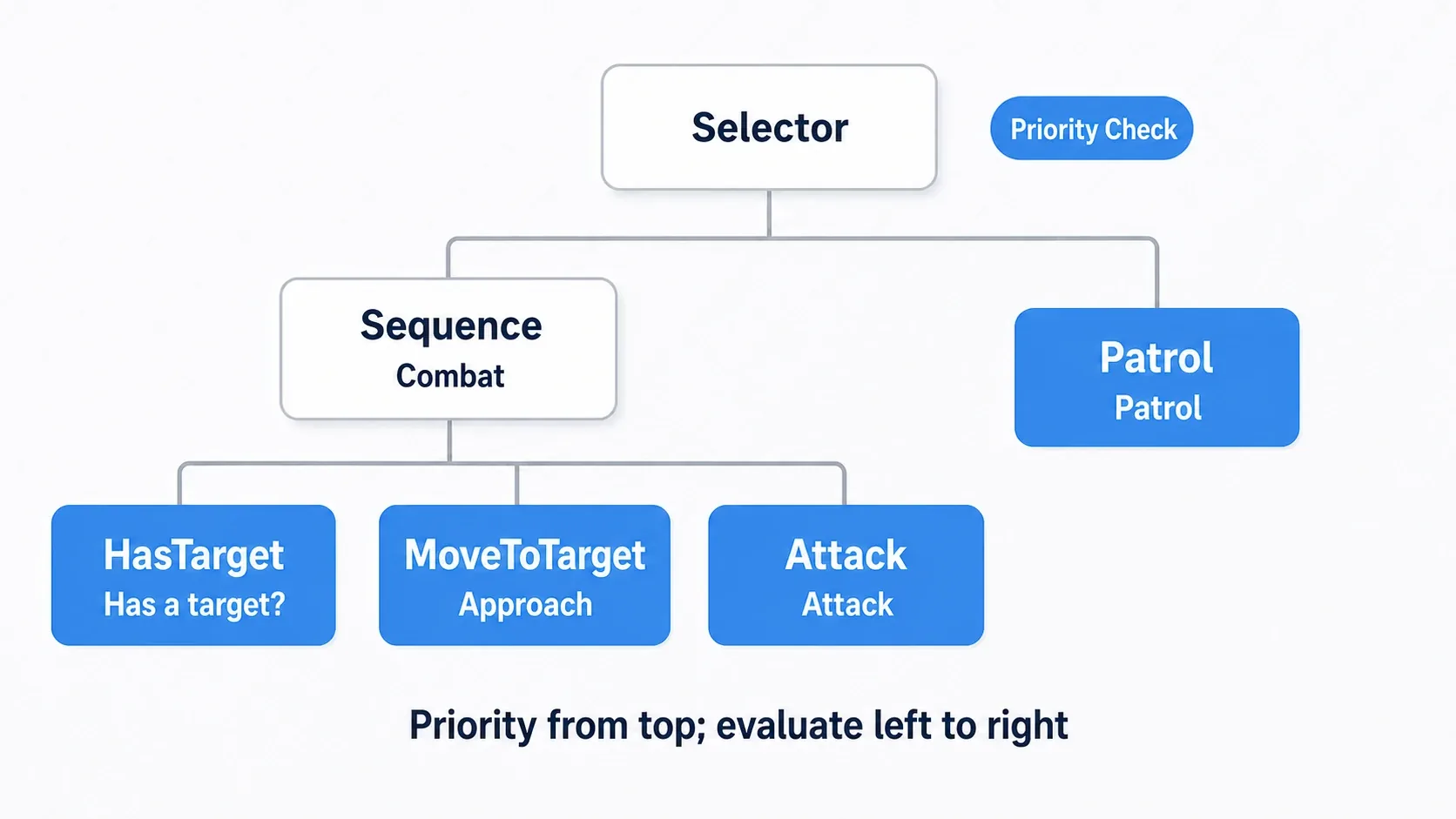
Build the tree like this. Making the root a Selector naturally expresses the priority "try combat first, fall back to patrol."
Enemy (CharacterBody2D)
└─ BehaviorTree (BTSelector)          … try the top branch (combat) first
   ├─ CombatSequence (BTSequence)     … combat only holds if everything lines up
   │  ├─ HasTarget   (condition: is there a target?)
   │  ├─ MoveToTarget(close in)
   │  └─ Attack      (attack)
   └─ Patrol         (patrol)          … the fallback when combat isn't available
The other three Leaf nodes in the tree are small scripts too. Scripts with a class_name show up in the Create Node dialog under names like BTSelector and BTHasTarget, so pick those to build the tree above.
# bt_has_target.gd(condition: is there a target?)
class_name BTHasTarget
extends BTNode

func tick(_actor: Node, blackboard: Dictionary) -> Status:
    return Status.SUCCESS if blackboard.get("target") else Status.FAILURE
# bt_attack.gd(attack: here it just prints once a second)
class_name BTAttack
extends BTNode

var last_attack := -100.0

func tick(_actor: Node, _blackboard: Dictionary) -> Status:
    var now := Time.get_ticks_msec() / 1000.0
    if now - last_attack < 1.0:
        return Status.RUNNING              # Wait until the next attack
    last_attack = now
    print("Attack!")
    return Status.SUCCESS
# bt_patrol.gd(patrol: visit the Blackboard's points in order)
class_name BTPatrol
extends BTNode

@export var move_speed: float = 60.0
var index := 0

func tick(actor: Node, blackboard: Dictionary) -> Status:
    var points: Array = blackboard.get("patrol_points", [])
    if points.is_empty():
        return Status.FAILURE
    var point: Vector2 = points[index]
    if actor.global_position.distance_to(point) < 5.0:
        index = (index + 1) % points.size()   # Move on to the next point once there
    actor.velocity = actor.global_position.direction_to(point) * move_speed
    actor.move_and_slide()
    return Status.RUNNING
The character itself just writes "is the player nearby?" to the Blackboard every frame and ticks the root (put the player in the player group).
extends CharacterBody2D

@onready var bt_root: BTNode = $BehaviorTree
var blackboard := {}

func _ready() -> void:
    blackboard["patrol_points"] = [Vector2(100, 100), Vector2(300, 100)]

func _physics_process(_delta: float) -> void:
    # Reflect the player detection result into the Blackboard (detection can live in a separate system)
    var player := get_tree().get_first_node_in_group("player")
    var near := player and global_position.distance_to(player.global_position) < 200
    blackboard["target"] = player if near else null
    # Evaluate the tree (this one line drives every behavior)
    bt_root.tick(self, blackboard)
There are two key points.
- Priority is decided by the order of branches: a
Selector's children are tried top-down, so placing "combat" above "patrol" means combat wins as long as the player is around. To change behavior priority, you just reorder branches. - Keep decisions (the BT) separate from detection and movement: leave "can I see the player?" to a stealth vision system and "how do I close in?" to NavigationAgent2D, and let the BT focus on deciding how to behave. That keeps every piece small.
Sharing Data with a Blackboard
The blackboard in the example above is a standard BT pattern. It collects data shared between nodes into a single dictionary that each node reads from and writes to.
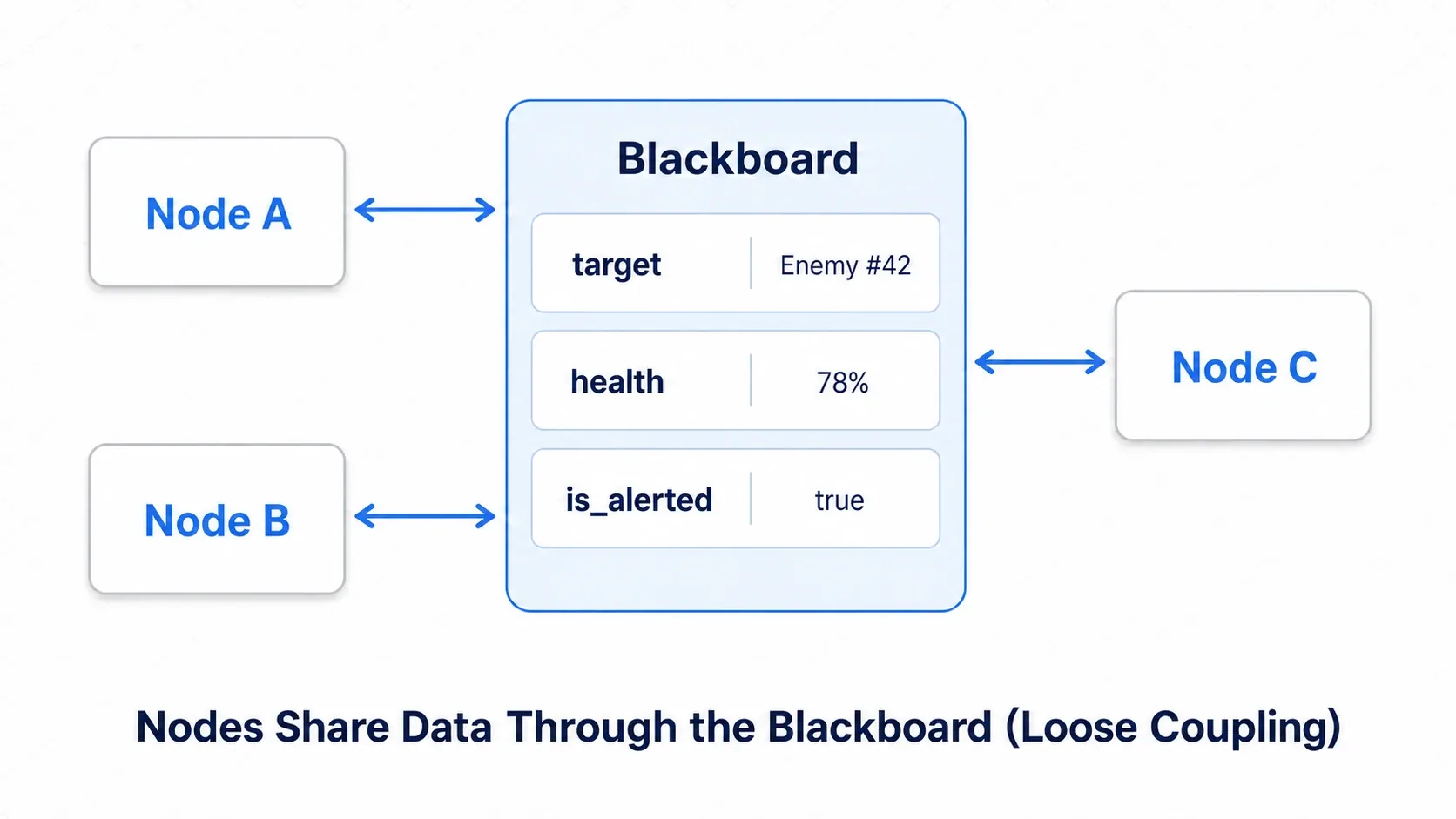
# Writing (updated by the detection system or the character itself)
blackboard["target"] = player
blackboard["health"] = 78
blackboard["is_alerted"] = true

# Reading (referenced inside each node's tick)
if blackboard.get("is_alerted"):
    # Go to alerted behavior
    pass
The essential part is that nodes never connect directly, they talk through the blackboard. Because of that, MoveToTarget works without knowing who wrote target. Centralizing data also makes debugging easier, and it stands alongside signals as a go-to loose-coupling technique.
Bonus: Limits and Next Steps
Everything so far is the basic form of a BT. Before shipping one, it helps to know the following.
- Where RUNNING resumes: this implementation re-evaluates everything from the root every frame. That's fine for a small tree, but as it grows, add an optimization that remembers where RUNNING was returned and resumes from there.
- Decorators add expressiveness: adding decorators like
Inverter(flip the result),Repeater(repeat), andTimeout(time limit) gives you the flexibility to "try for N seconds" or "read a failure as a success." - Addons are an option: for larger projects, beehave is a strong choice. You can build trees visually, which keeps big trees readable. Understanding the mechanism by hand first makes the addon's behavior much easier to follow.
- Use it alongside state management: BTs and state machines aren't rivals. A common setup combines them: big states in a state machine and the fine-grained behavior inside each state in a BT.
Summary
- A BT is a design approach that expresses behavior as a tree of tasks, strong at prioritized, complex AI (Godot has no built-in feature, so build it or use an addon)
- Sequence (AND) aborts on the first failure and Selector (OR) commits on the first success, a mirror-image pair
- Write the real work in leaves and use
RUNNINGto mean "still in progress." Keeping them small and single-purpose makes them reusable - An enemy AI tree expresses "combat, then patrol" priority via a
Selectorroot - A Blackboard shares data between nodes with loose coupling
Start with a small tree that puts a combat Sequence and a patrol Leaf under a Selector. Once you feel how behaviors accumulate just by adding branches, the strength of BTs becomes obvious.
Further Reading
- Managing AI and Player States with State Machines: the other half of AI design, and usable alongside BTs
- Stealth Game Vision Systems: producing the "did we spot the player?" result you hand to the BT
- Pathfinding with NavigationAgent2D: what goes inside MoveToTarget (path movement)
- OOP Design Patterns in GDScript: organizing nodes with class_name and inheritance
- Attack Hitbox Basics: the hit detection to put inside the attack Leaf, without hitting the same target twice
- beehave - Godot Behavior Tree Addon (GitHub): a production-ready BT addon