Build an RPG or an action game and you'll always hit character mass production. The basic Slime is done. But as you flesh out your levels you start wanting a high-HP slime, a red slime with double attack, a metal slime with a rare drop, and on and on.
The tempting first move is to copy Slime.tscn and tweak numbers one at a time, but that breaks down fast. The day you decide "all slimes should move faster," you're opening every copied scene to fix it. This article covers the elegant solutions: scene inheritance, Editable Children, and data-driven Resources for larger projects, along with when to use each.

What You'll Learn
- Scene inheritance, the standard way to derive variants from a template by changing only the differences
- How parent changes propagate automatically to every child, and how to extend with
super- Editable Children, the quick exception for changing "just this one instance"
- When to use data-driven Resources instead
Tested with: Godot 4.7
Scene inheritance: deriving from a template
Scene inheritance brings the object-oriented idea of class inheritance into Godot's scenes. You take an existing scene as the parent and create child scenes that inherit all of its structure and functionality. If you care about reusability and maintainability, this is the first option to reach for.
Inheritance has two strengths.
- You manage only the differences: in a child scene, you can freely override properties inherited from the parent (position,
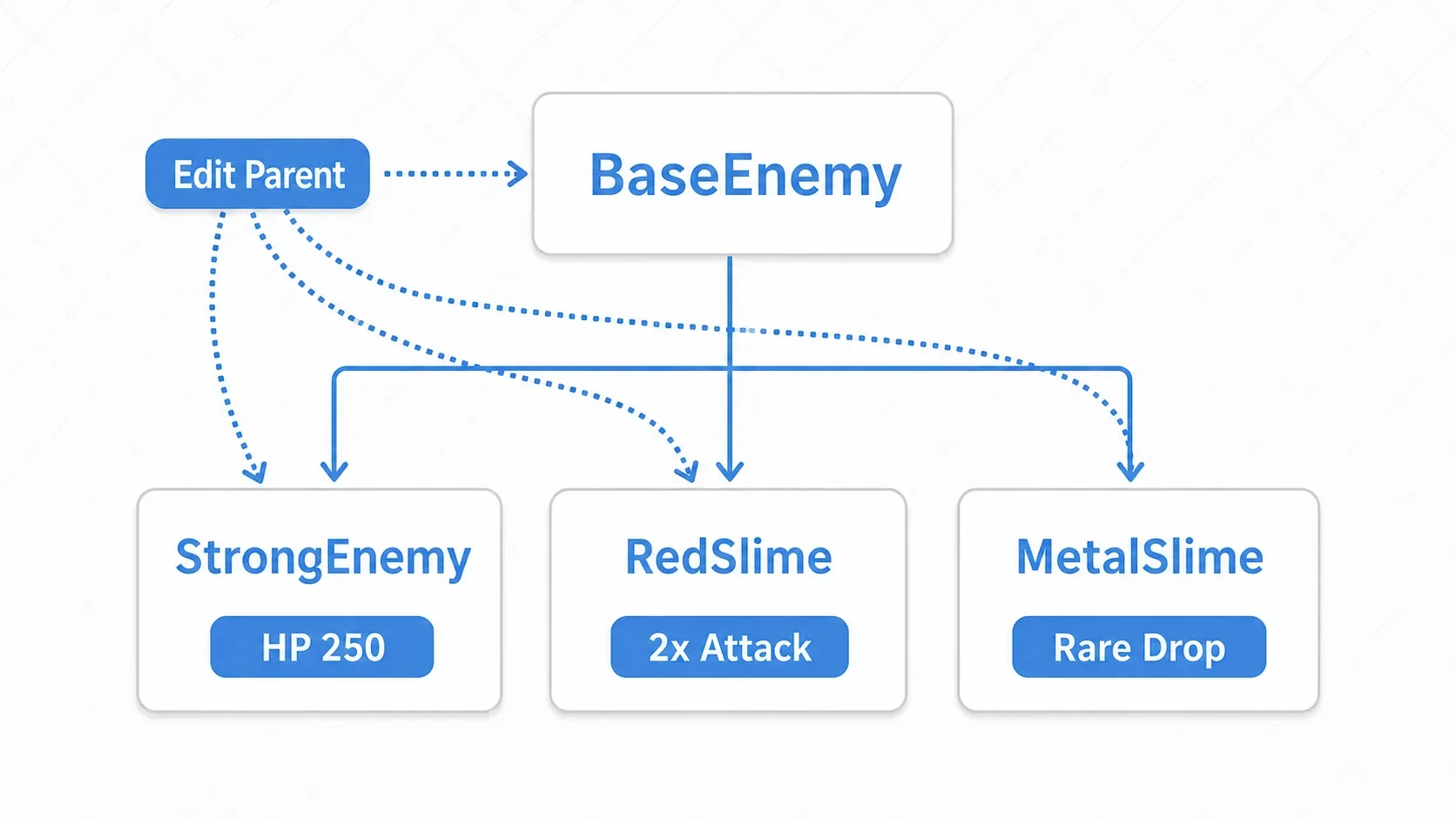
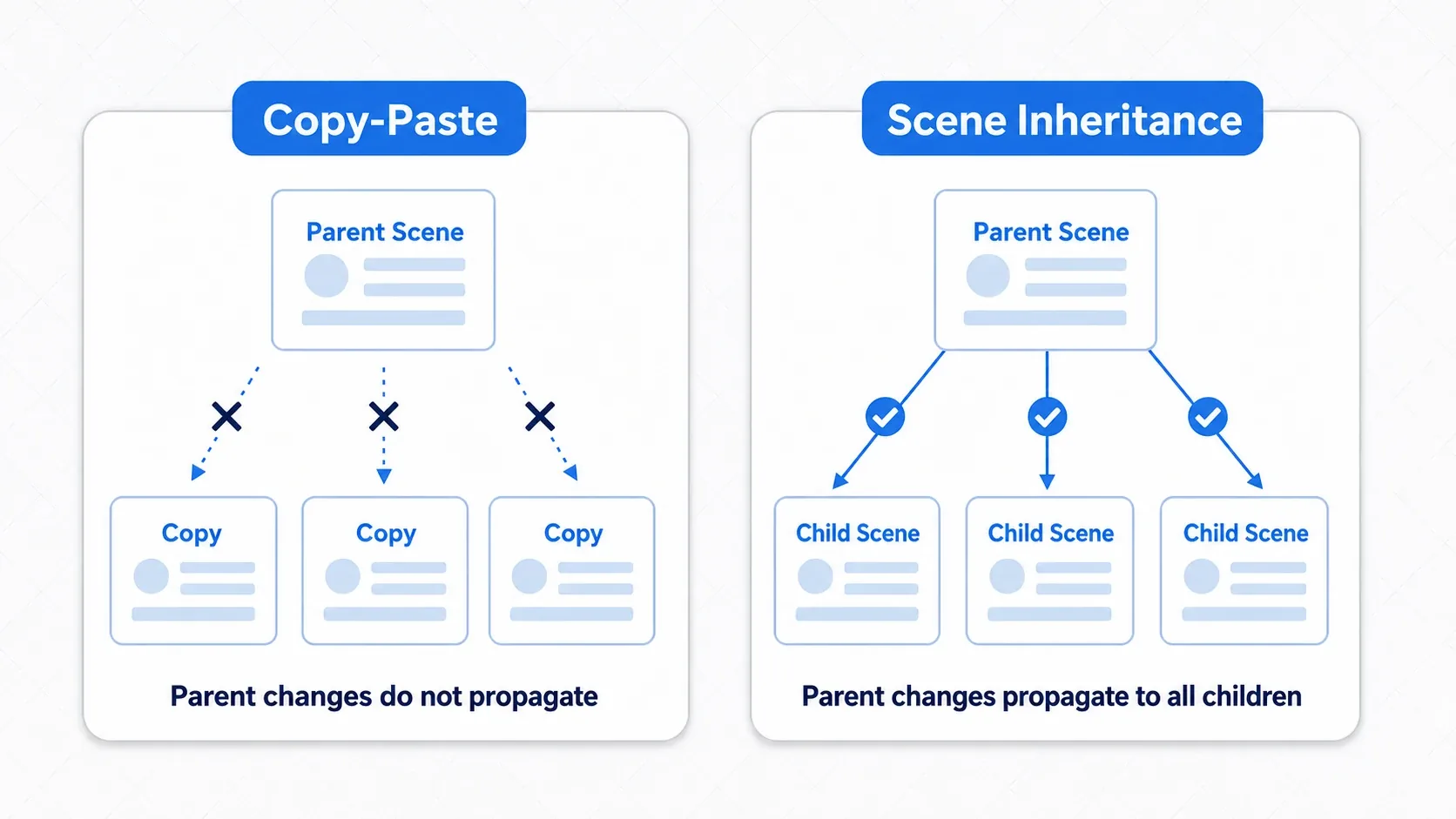
@exportvariables). Changed items get a "revert" icon in the Inspector, so the differences from the parent are visible at a glance. - Parent changes reach the children automatically: this is the big one. Add a bug fix or a new feature to the parent scene and the change propagates to every child scene. "One fix for all characters" and "individual tuning per character" hold at the same time.
This is decisively different from copy-paste. A pasted duplicate has severed its tie to the original, so a later shared fix means editing every one by hand.
Hands-On: producing enemy variants from BaseEnemy
Slime recolors in an RPG, buffed mooks in an action game, enemies with different bullet types in a shoot-'em-up: "a shared foundation plus per-type differences" is exactly what scene inheritance is for. Let's build it.
First, create BaseEnemy.tscn as the foundation for every enemy and attach a shared script. The trick is to make the numbers @export so children and the Inspector can adjust them.
# base_enemy.gd
extends CharacterBody2D

@export var health: int = 100     # @export lets inheriting scenes override it individually
@export var attack_power: int = 10
@export var speed: float = 50.0

func take_damage(amount: int) -> void:
    health -= amount
    if health <= 0:
        die()

func die() -> void:
    queue_free()                  # Shared death handling (reused by every enemy)
Next, right-click BaseEnemy.tscn in the FileSystem dock and choose "New Inherited Scene" to create StrongEnemy.tscn. At this point it looks and behaves exactly like the parent. Just override health to 250 and attack_power to 25 in the Inspector and the buffed version is done, without writing a single line of code.
You can also extend the parent's functionality with your own script. Override the parent's methods while still calling the parent's implementation through super.
# strong_enemy.gd
extends "res://base_enemy.gd"

func die() -> void:
    print("The mighty foe lets out a dying roar!")   # Extra flourish for this enemy only
    super.die()                                      # Also run the parent's die() (queue_free, etc.)
There are two points worth noting.
- Shared logic in BaseEnemy, differences overridden in children: shared movement and damage logic lives in one place, in
BaseEnemy. Children hold only "what's different." So when you later want to fix movement for every enemy, one fix inBaseEnemyreaches every variant. - Use
superto build on the parent: instead of rewritingdie()wholesale, you add only the extra flourish and reuse the parent's cleanup viasuper.die(). You extend without breaking the parent's behavior.
Warning:
queue_free()doesn't delete the node right away; it deletes it once the current frame finishes processing. Continuing to reference a deleted node causes null reference errors. When other nodes hold references, get into the habit of checking validity withis_instance_valid()or cleaning up viaNOTIFICATION_PREDELETE.
For the concept of inheritance itself, OOP Design Patterns in GDScript is also worth a read.
Editable Children: changing just this one instance
If scene inheritance is for "creating a reusable template," Editable Children is for "tweaking one specific placed instance on the spot." It lets you edit the internal nodes of an instantiated child scene without creating a new scene file.
It shines for one-off adjustments like these.
- Enlarging the arm
CollisionShape2Don just the one golem in the boss room to widen its attack range (the size lives on theShaperesource, which is shared with the other golems, so right-click theShapeand choose "Make Unique" first) - Setting
speedto 0 on just the first tutorial enemy so it doesn't move
It's easy to do. Right-click an instance placed in the main scene and check "Editable Children," and its internal nodes expand in the tree, ready to select and edit directly.
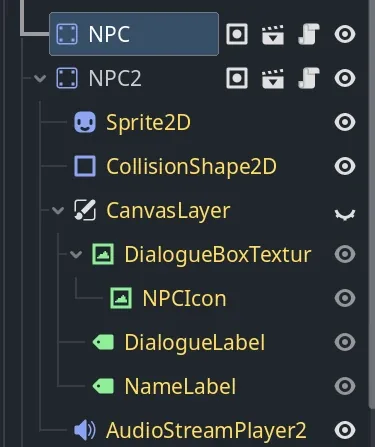
In the image above, NPC is a regular collapsed instance, while NPC2 has Editable Children enabled and its internal Sprite2D and CollisionShape2D are expanded and editable.
That said, the change applies only to that instance and can't be reused. If you think "I'll probably want this again," the standard move is to right-click and choose "Save Branch as Scene" to write it out as a new scene file.
Choosing between them, and data-driven Resources
The three approaches are chosen by purpose.
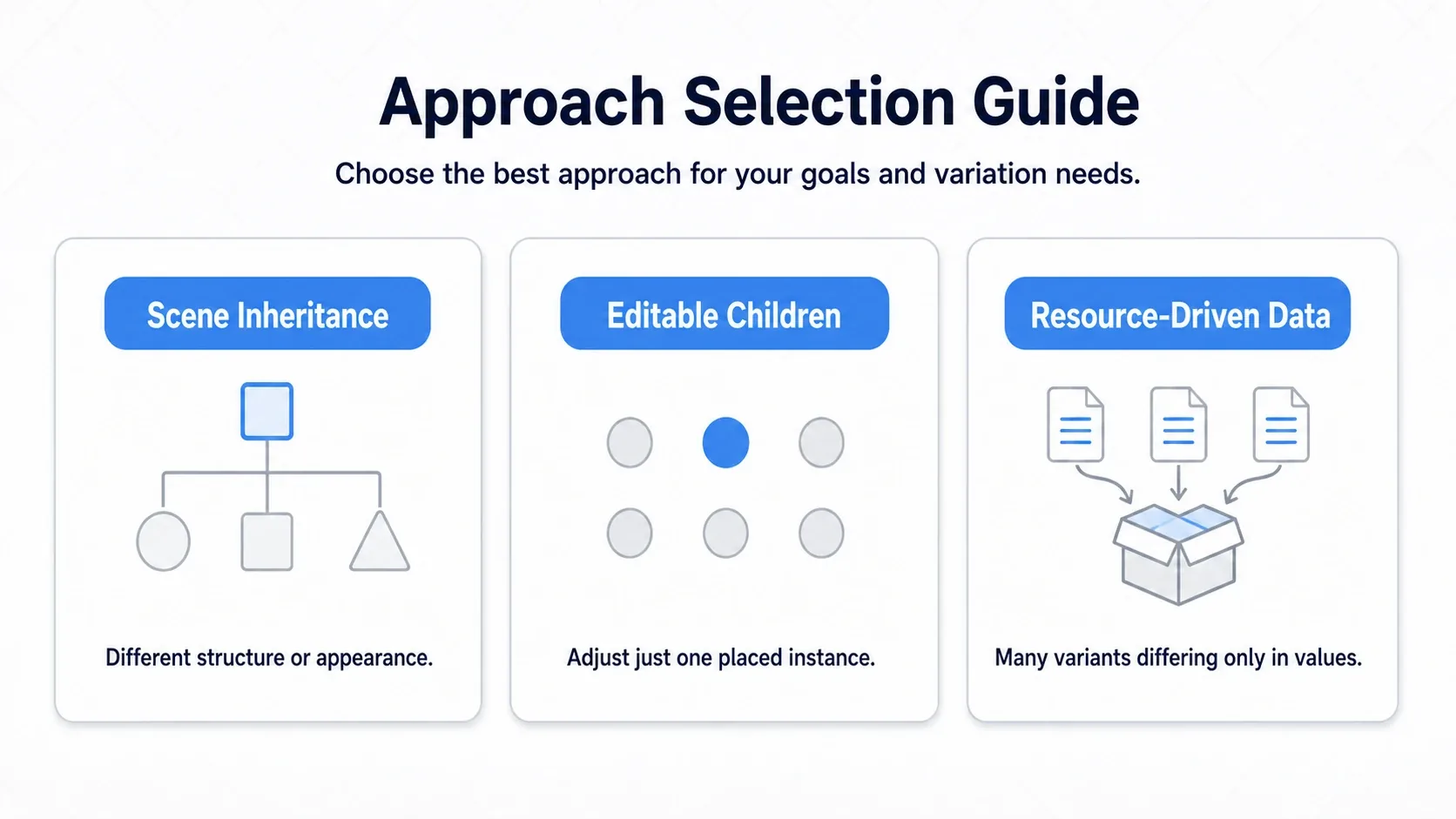
- Scene inheritance: variations where the node structure or visuals change per type. The default strategy.
- Editable Children: a one-instance exception. A throwaway tweak.
- Data-driven Resources: many variations where only numbers differ.
At the scale of an RPG with hundreds of monster types in particular, scene inheritance alone leaves you with too many scene files to manage. That's where "data-driven design," separating character parameters into a Resource, pays off.
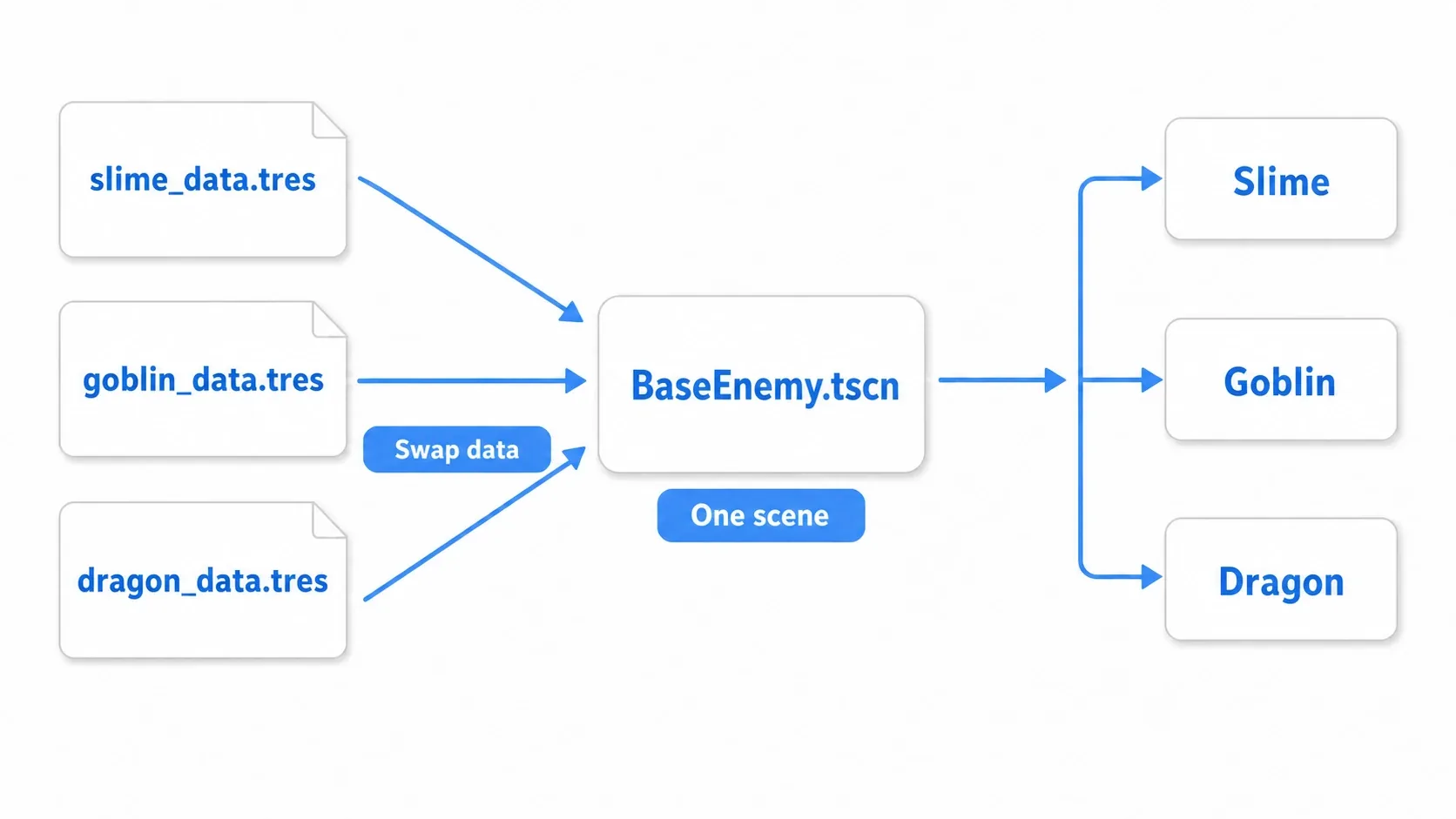
Give BaseEnemy.tscn a single @export var data: CharacterData and swap in slime_data.tres or dragon_data.tres, and you can express hundreds of enemy types while keeping one scene. Parameter tuning happens entirely in the .tres files. See Creating and Using Custom Resources for details.
"Different visuals and structure means inheritance, different numbers only means data-driven," and combining the two (plugging a data resource into an inherited scene) is the practical landing spot.
Common mistakes and best practices
| Common mistake | Best practice |
|---|---|
| Handling everything with Editable Children | Choose scene inheritance whenever reuse is possible. If you think "I might use this later," make it an inherited scene |
| Nesting inheritance too deeply | Keep inheritance to two or three levels. Beyond that, consider composition or a data-driven approach instead |
| Parent scenes assuming things about child state | Keep the parent self-contained and providing general functionality. Concrete behavior is the child's decision |
| Adding scripts just to change a number | Make HP, attack power, and speed @export so designers can adjust them safely in the Inspector |
Bonus: Good to know for later
- Composition over inheritance: the classic object-oriented advice. Rather than deep inheritance, adding functionality as child nodes ("composition") often works more flexibly in Godot. Combining an "attack component" and an "HP component" is your next move when inheritance starts to feel limiting.
- Runtime performance isn't a concern: scene inheritance and Editable Children both end up interpreted as one scene tree, so there's no meaningful runtime difference. Choose based on maintainability.
- Inherited scenes can't delete nodes: nodes that come from the parent can't be deleted by the child. If you don't need one, call
queue_free()from the child scene's script (just hiding it doesn't stop its collision or scripts).
Summary
- Scene inheritance is the standard way to derive variants from a template by changing only the differences. Parent changes propagate to every child automatically
- Using
superin a child script lets you extend while keeping the parent's behavior - Editable Children is the exception path for tweaking one placed instance on the spot. It can't be reused
- Large numbers of variations are easier to manage with data-driven Resources (one scene plus one
.tresper type) - Choose by: "different structure means inheritance," "different numbers only means data-driven," "just one instance means Editable Children"
Start by creating a single BaseEnemy and overriding health in an inherited scene. Once you feel how "fixing the parent fixes everything," designing for mass production gets a lot easier.
Further Reading
- Scenes and Nodes Explained - instantiation and scene fundamentals
- Creating and Using Custom Resources - separating parameters with a data-driven approach
- OOP Design Patterns in GDScript - inheritance versus composition
- Godot Docs: Scene Inheritance - the primary source on scene inheritance