You add "idle", "patrol", "chase", and "attack" to an enemy AI and the if statements keep multiplying. You add "move", "jump", "attack", and "take damage" to the player and suddenly is_attacking and is_damaged are both true, producing strange behavior.
A state machine is what sorts out this kind of state-management mess. It looks like an intimidating design pattern, but just deciding "there is exactly one current state" already helps a lot.
What You'll Learn
- Why managing state with bools falls apart
- Building a small state machine with
enumandmatch- Implementing
Idle/Patrol/Chase/Attackfor an enemy AI- How to decide when to move to state classes
Tested with: Godot 4.7
A State Machine Means "Exactly One Current State"
A state machine is a way of organizing the states a character or enemy can be in, and the conditions under which those states switch.
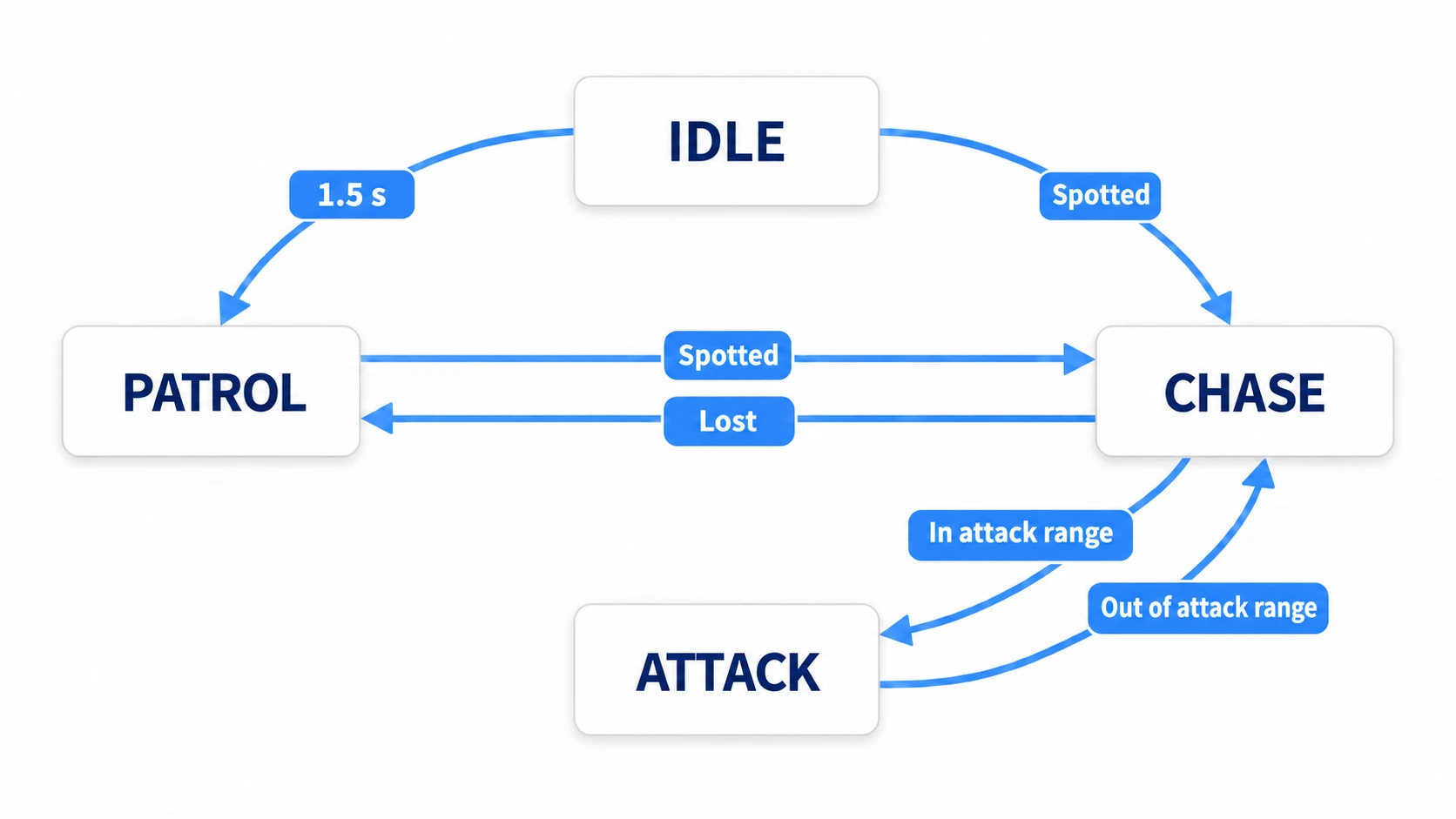
For an enemy AI, you might think of it like this.
- Idle: Wait in place.
- Patrol: Walk around a set area.
- Chase: Spot the player and go after them.
- Attack: Close enough, so attack.
The key point is that the enemy is never in Patrol and Attack at the same time. You pick exactly one current state and separate the logic per state.
Avoiding bool Hell
Starting with nothing but bool state is easy at first.
var is_jumping := false
var is_attacking := false
var is_damaged := false
But as states pile up, the combinations explode: "what if I take damage mid-attack?", "what if a jump input arrives while damaged?", "what if the attack animation ends while dying?"
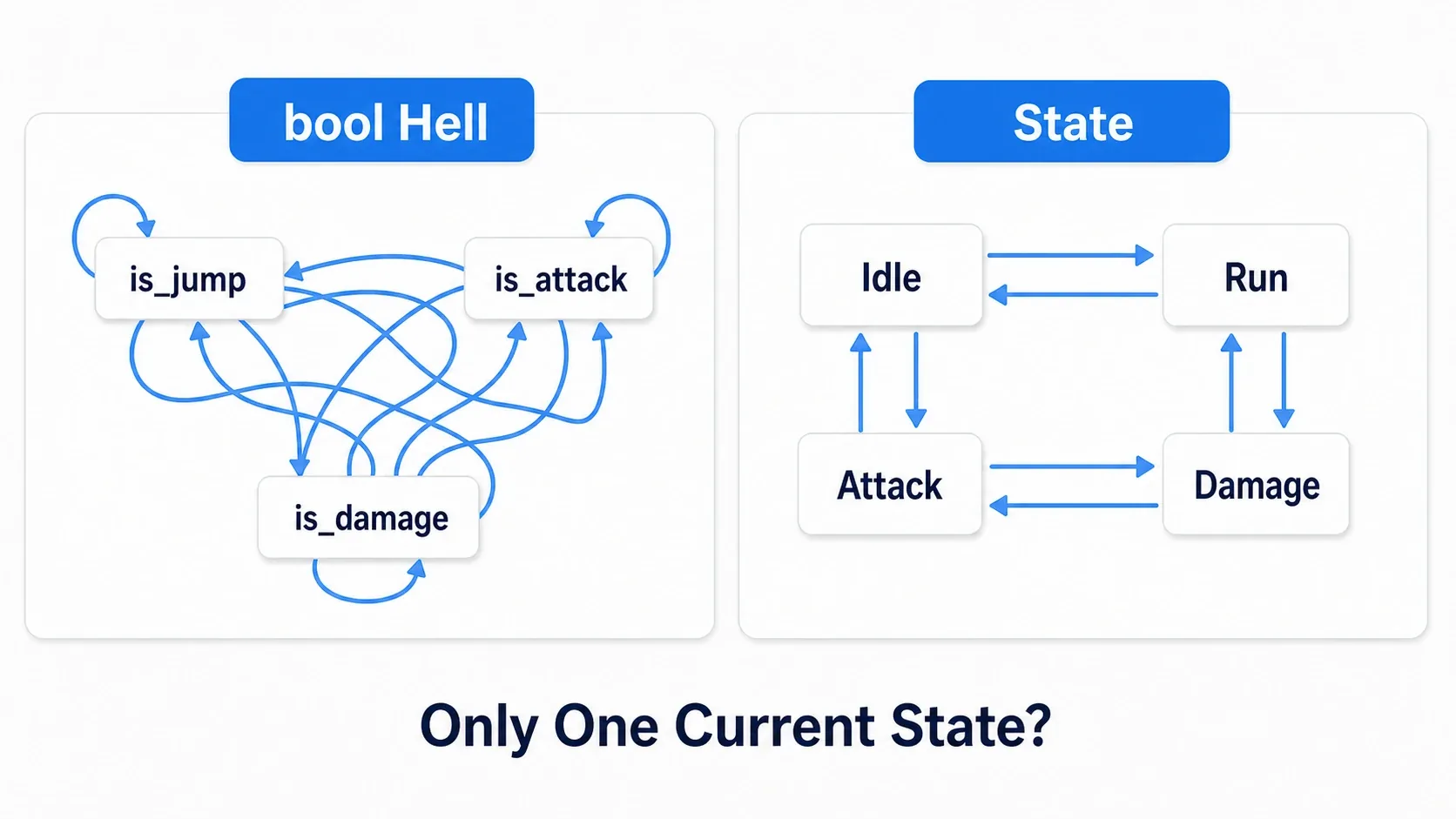
A state machine keeps only one current state.
enum State {
    IDLE,
    RUN,
    ATTACK,
    DAMAGE,
}

var current_state: State = State.IDLE
That alone makes "am I attacking or taking damage right now?" unambiguous.
Hands-On: Building an Enemy AI with enum and match
Let's start small and build an enemy AI with enum and match.
# Enemy.gd
extends CharacterBody2D
class_name Enemy

enum State {
    IDLE,
    PATROL,
    CHASE,
    ATTACK,
}

@export var speed: float = 80.0
@export var attack_range: float = 32.0

var current_state: State = State.IDLE
var player: Node2D
var patrol_direction := Vector2.RIGHT

@onready var sprite: AnimatedSprite2D = $AnimatedSprite2D
@onready var idle_timer: Timer = $IdleTimer

func _ready() -> void:
    # Connect the Timer that ends the idle wait (connecting it in the editor works too)
    idle_timer.timeout.connect(_on_idle_timer_timeout)
    # Call the first state's entry logic directly (change_state() does nothing for the same state)
    _enter_state(current_state)

func _physics_process(delta: float) -> void:
    # This function only dispatches to the per-state logic
    match current_state:
        State.IDLE:
            _state_idle(delta)
        State.PATROL:
            _state_patrol(delta)
        State.CHASE:
            _state_chase(delta)
        State.ATTACK:
            _state_attack(delta)
Drawn as a diagram, this code just reads current_state and lets match dispatch to the matching state function.
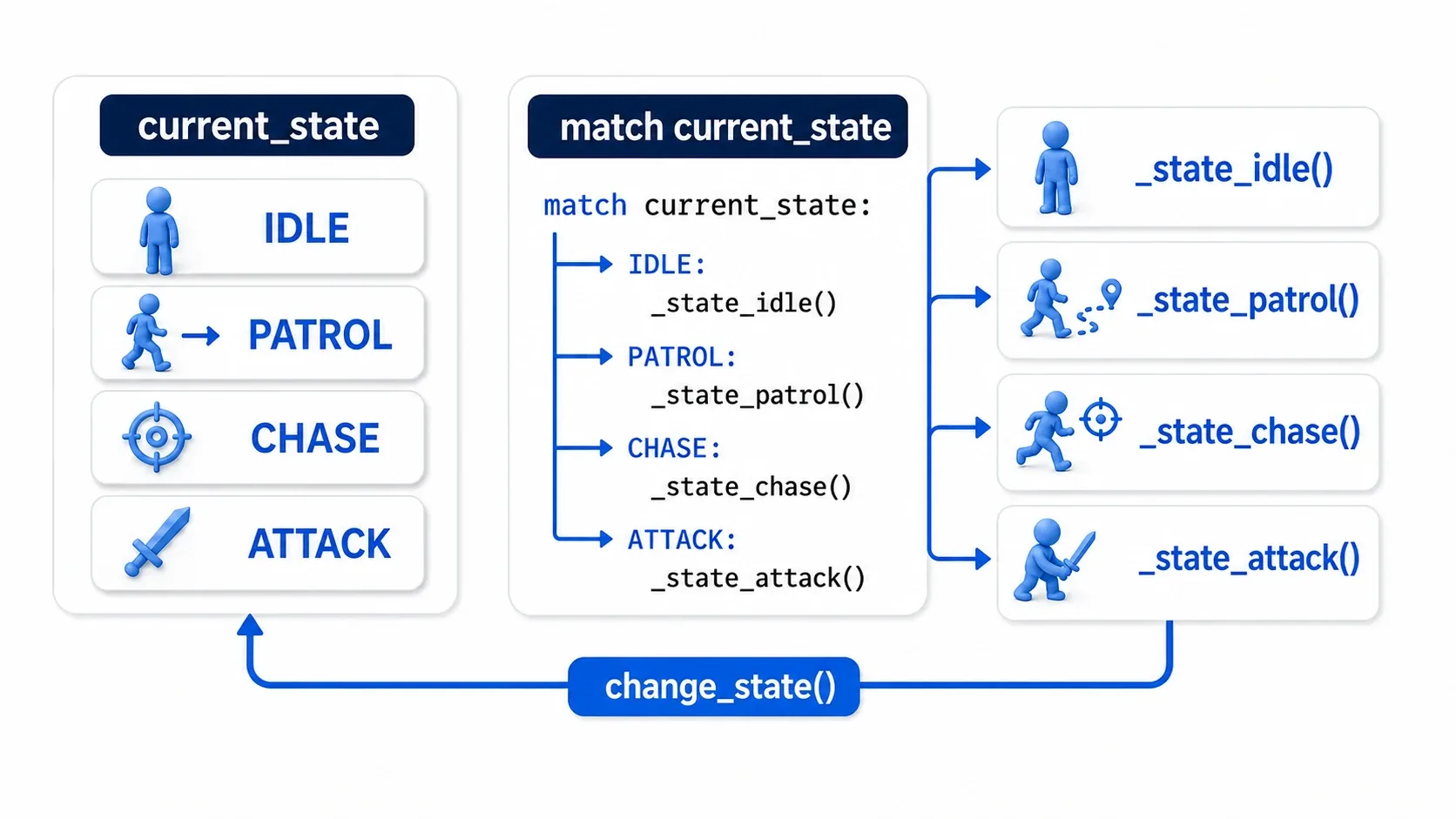
_ready() doesn't call change_state(State.IDLE) because current_state already starts as IDLE. change_state() does nothing when switching to the same state, so the entry logic (playing the animation and starting the Timer) would never run and the enemy would stay idle forever.
Keep _physics_process() as pure traffic control. Pushing per-state logic into separate functions keeps things readable.
func _state_idle(delta: float) -> void:
    velocity = Vector2.ZERO

    # Switch to chasing once the player is spotted
    if can_see_player():
        change_state(State.CHASE)

func _state_patrol(delta: float) -> void:
    velocity = patrol_direction * speed
    move_and_slide()

    if can_see_player():
        change_state(State.CHASE)

func _state_chase(delta: float) -> void:
    if player == null:
        # Go back to patrolling if there's nothing to chase
        change_state(State.PATROL)
        return

    var direction := global_position.direction_to(player.global_position)
    velocity = direction * speed
    move_and_slide()

    if global_position.distance_to(player.global_position) <= attack_range:
        # Switch to attacking once inside attack range
        change_state(State.ATTACK)
    elif not can_see_player():
        change_state(State.PATROL)

func _state_attack(delta: float) -> void:
    velocity = Vector2.ZERO

    if player == null:
        change_state(State.PATROL)
        return

    if global_position.distance_to(player.global_position) > attack_range:
        change_state(State.CHASE)
As states multiply, it stays obvious which function a piece of logic belongs in.
Funnel Transitions Through change_state
When changing state, don't write current_state = State.CHASE directly. Go through a dedicated function.
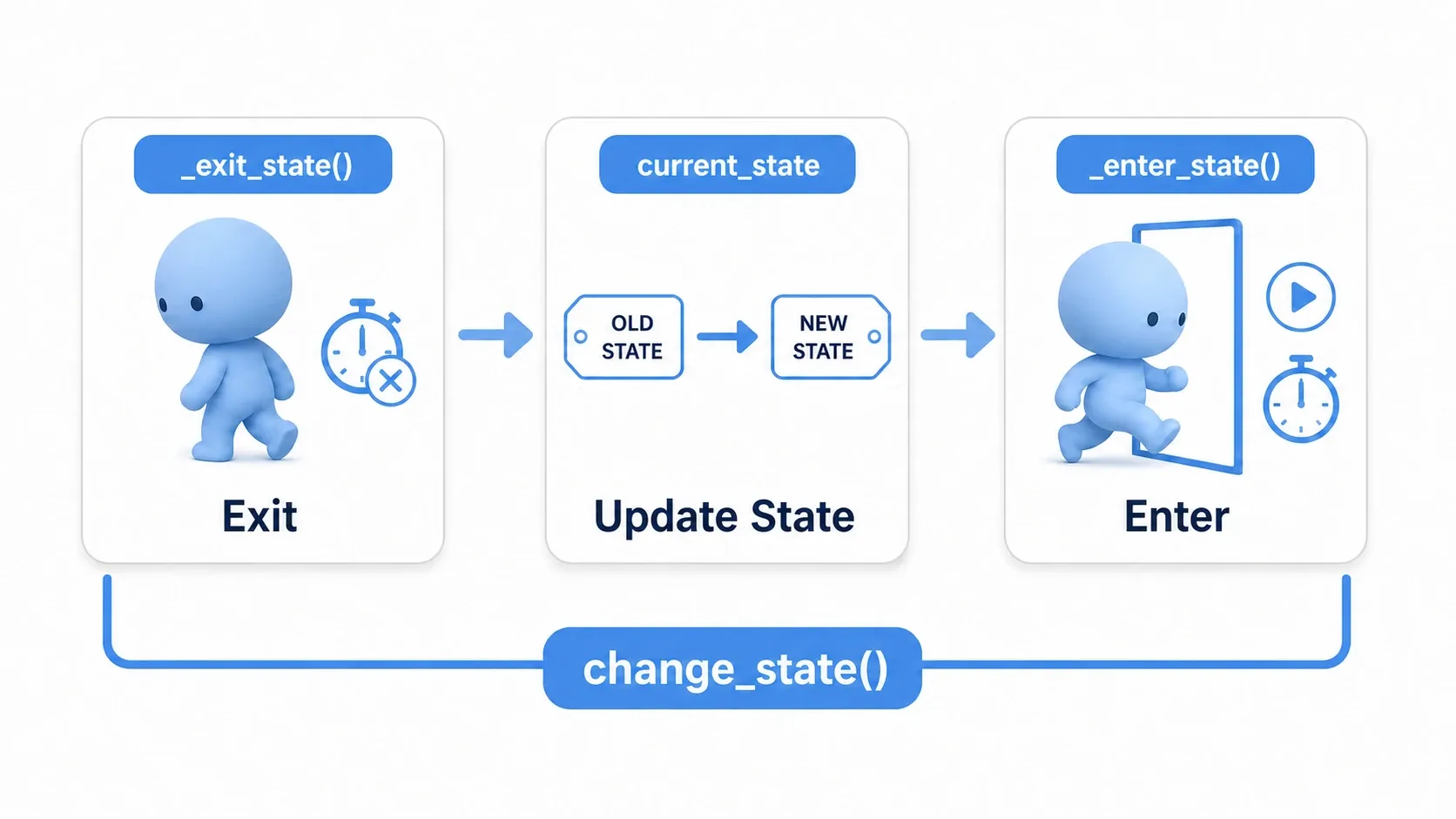
func change_state(next_state: State) -> void:
    if current_state == next_state:
        return

    # Always run exit, state update, and entry in this same order
    _exit_state(current_state)
    current_state = next_state
    _enter_state(current_state)
Separate what happens the moment you enter a state from what happens when you leave it.
func _enter_state(state: State) -> void:
    # Everything that should run only on entering a state
    match state:
        State.IDLE:
            sprite.play("idle")
            idle_timer.start(1.5)
        State.PATROL:
            sprite.play("walk")
        State.CHASE:
            sprite.play("run")
        State.ATTACK:
            sprite.play("attack")

func _exit_state(state: State) -> void:
    # Everything that cleans up when leaving a state
    if state == State.IDLE:
        idle_timer.stop()
With this shape, things like "play the animation the instant we enter the attack state" and "stop the Timer when leaving idle" all live in one place.
func _on_idle_timer_timeout() -> void:
    # Even when triggered by a Timer, check the current state before transitioning
    if current_state == State.IDLE:
        change_state(State.PATROL)
When Timers or signals change the state, always route them through change_state() too.
When to Split Into State Classes
enum + match is ideal for starting small. Once per-state logic gets long, though, consider splitting each state into its own file.
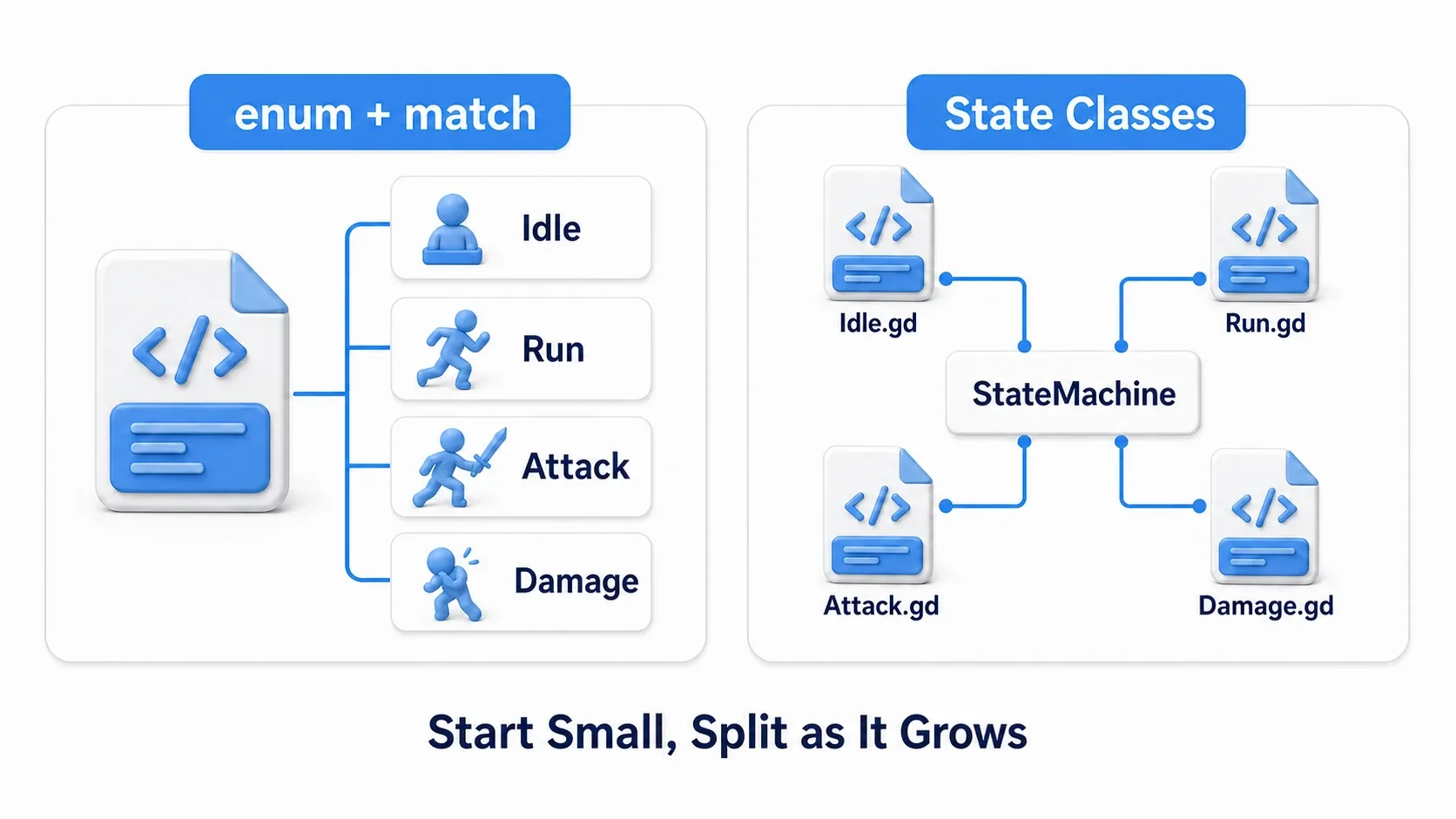
With state classes, each state becomes its own file, like IdleState.gd and ChaseState.gd.
# State.gd
class_name State
extends Node

var owner_enemy: Enemy

func enter() -> void:
    pass

func exit() -> void:
    pass

func physics_update(delta: float) -> void:
    pass
ChaseState is responsible for chasing and nothing else.
# ChaseState.gd
extends State

func enter() -> void:
    owner_enemy.sprite.play("run")

func physics_update(delta: float) -> void:
    if owner_enemy.player == null:
        owner_enemy.change_state("Patrol")
        return

    var direction := owner_enemy.global_position.direction_to(owner_enemy.player.global_position)
    owner_enemy.velocity = direction * owner_enemy.speed
    owner_enemy.move_and_slide()

    if owner_enemy.can_attack_player():
        owner_enemy.change_state("Attack")
The class approach adds files, so it feels a bit heavy up front. With around four states and short logic, enum + match is often the more readable option.
How This Relates to AnimationTree
Godot's AnimationTree also has a StateMachine. That one primarily manages animation state.
The state machine in this article manages game logic state, like enemy AI or player control. In real projects, you switch the AnimationTree's animation at the moment the logic state changes.
func _enter_state(state: State) -> void:
    match state:
        State.IDLE:
            animation_tree["parameters/playback"].travel("Idle")
        State.CHASE:
            animation_tree["parameters/playback"].travel("Run")
        State.ATTACK:
            animation_tree["parameters/playback"].travel("Attack")
Detailed control on the animation side leads into AnimationTree and State Machines.
Common Pitfalls
Writing to the State Variable Directly
Scattering current_state = State.ATTACK around your code means entry and exit logic such as playing animations or stopping Timers gets skipped. Funnel state changes through change_state().
One State Function Balloons
If _state_chase() passes 100 lines, split detection, movement, and attack checks into helper functions. If that still hurts, move to state classes.
Turning Everything Into a State Machine
You don't need a full state machine for simple states like a switch's on/off or a chest that opens once. With only two states and little branching, a bool like is_opened is plenty.
Confusing State With Animation
Being in the Attack state doesn't necessarily mean exactly one attack animation. Combo attacks, weapon types, and facing direction can all split the animation. Keep logic state and animation state as separate concepts when you need to.
Bonus: When to Consider a Behavior Tree
State machines are good at organizing "what state am I in right now?" But once an enemy AI starts choosing actions by priority, like "hide", "heal", "call for help", or "flank the player", pure state transitions get complicated.
At that point, a behavior tree becomes a candidate. It's a design where a tree structure decides "given these conditions, which action takes priority?" In the Godot learning path, we cover it later in Designing AI with Behavior Trees.
For player controls, what switches states is a button rather than distance. How to build a hero who can't move mid-attack and returns to walking afterward is covered in Player State Machine Basics.
Summary
A state machine is the fundamental pattern for organizing player and enemy AI states.
- Consider adopting it once bools like
is_attackingandis_damagedpile up. - Start small with
enumandmatch. - Funnel state changes through
change_state(). - Split into State classes once per-state logic gets big.
- Keep it conceptually separate from AnimationTree's StateMachine.
The test is: "Can I settle on exactly one current state?" If you can, a state machine works well. If your AI is instead picking among several conditions by priority, it's worth looking at behavior trees.